Overview and purpose of the "ToC Page" plugin for Cotonti
How do I create my own knowledge base or user documentation for a web application, whether it's a module or an author's developed information product? - there is a solution, - this is the "ToC Page".

Overview and Purpose of the toc_page Plugin for Cotonti
Version: 1.0.1
Author: webitproff
License: BSD
Source code: github.com/webitproff/toc_page-cotonti
Table of Contents
- Plugin Purpose
- Problems It Solves
- Key Features
- Who It Is For
- General Working Principle
- Administrator Interface
- Example: Knowledge Base for an OpenCart Product Filter Module
- Example: Documentation for a Website Template
- Example: Developer Reference
- Admin Table: What It Looks Like
- Frontend Output: What Visitors See
- Multilingual Support and Localization
- Use Cases
- Worldwide Analogues and Practices
- Advantages Over Automatic Menus
- License and Source Code
- Conclusion
Plugin Purpose
The toc_page plugin is built for websites running on the Cotonti CMF. It allows an administrator to manually build and manage a table of contents, navigation tree, or documentation structure. It is not an automatic page list generator; instead, it gives you full control over the order, nesting, and composition of sections.
The core idea is simple: you create a tree, add elements to it — categories, individual pages, or custom links — arrange them in the desired order, and display them on the site as a neat list. This is done without changing the structure of the Cotonti pages themselves and without relying on the automatic order of categories.
The plugin solves a problem faced by site owners and developers: how to create a user-friendly knowledge base, product documentation, help center, or simply a structured menu that can be changed quickly and adapted to the task. It works equally well for a small business card site and a large portal with dozens of sections.
Problems It Solves
When a site has many pages and categories, sooner or later there is a need to present them to visitors in a clear order. The built-in Cotonti category structure is good, but it does not always match the logic of documentation. For example, pages in the “Modules” category might be better placed under “Guides” from the visitor's perspective. An automatic menu cannot do this without moving pages between categories.
The toc_page plugin solves this problem. You can:
- combine pages from different categories into a single tree;
- arrange them in any order, regardless of publication date or alphabet;
- create a multi-level hierarchy: section, subsection, page;
- add external links to third-party resources;
- temporarily hide individual items without deleting content;
- use multiple independent trees for different areas of the site.
All this makes the plugin an ideal solution for building sections such as “Help,” “Documentation,” “Knowledge Base,” “User Guide,” “FAQ,” and other reference sections where order and structure matter more than automatic sorting.
Key Features
toc_page provides a set of simple but powerful features that cover most content organization tasks.
Manual Tree Management
Each tree element can be moved up or down, have its parent changed, and be assigned a sort order. This allows you to arrange the structure exactly as intended, not as dictated by the system.
Three Types of Elements
- Category — a link to a Cotonti page category. It allows you to show all materials of a category as one item or use a category as a heading for nested pages.
- Page — a link to a specific Cotonti page. You can add any pages to the tree, even if they are in different categories.
- Custom Link — a link to any URL: another section of the site, an external resource, a file, or a document. Useful for adding external guides, forums, marketplaces.
Flexible Hierarchy
Nesting depth is not strictly limited, but in practice 3–4 levels are enough to keep the structure understandable. You decide what is a parent and what is a child.
Multiple Trees
You can create an unlimited number of trees. For example, one for documentation of one product, another for help on another, and a third for a service menu in the site footer.
Localization
If the i18n plugin is enabled, category and page titles are automatically picked up in the current locale language. This saves time when creating multilingual reference sections.
Visibility Management
Each element can be temporarily disabled without deleting it. This is convenient when preparing new sections or seasonal promotions.
Simple Frontend Output
The tree is displayed with a single function in any template. You can place it in the sidebar, header, footer, or on a separate page.
Who It Is For
The plugin is useful for different groups of Cotonti users.
Product Developers
The author of a module, plugin, or template can quickly create a public knowledge base for their product. For example, the developer of a product filter module for OpenCart can create a section with installation instructions, configuration, common errors, and frequently asked questions.
Site Owners
An online store or service owner can organize a “Help” section with guides on payment, delivery, returns, personal account, and other topics.
Administrators and Content Managers
Those who fill the site with articles and instructions no longer need to remember in which category the material is located. They can manually assemble a convenient table of contents and update it as needed.
Web Studios and Freelancers
When handing over a project to a client, you can quickly prepare documentation on site management by gathering the necessary pages into one tree.
General Working Principle
Working with the plugin consists of three simple steps.
- Creating a tree. You give it a name and description. This is a container for the future table of contents.
- Adding elements. You add categories, pages, or links and immediately indicate where they should be located in the hierarchy.
- Output on the site. A call to the tree by its ID is inserted into the desired template location. The visitor sees a ready structured list.
No complex programming is required. All operations are performed in the Cotonti administration panel.
Administrator Interface
In the admin panel, the plugin is represented by two tabs: “Trees” and “Edit Tree”.
“Trees” Tab
Here is a list of all created trees. For each tree, the ID, name, and description are displayed. You can immediately go to its contents, rename it, or delete it.
New trees are also created in this tab: just enter a name and description.
“Edit Tree” Tab
This is the workspace for managing elements. The top shows which tree is being edited. Below is a table of all elements with columns:
- Element ID
- Type (category, page, or custom link)
- Link to object (category or page name, or URL)
- Title (can be changed manually)
- Parent (dropdown for setting nesting)
- Order (numeric field for sorting)
- Enabled (visibility checkbox)
- Actions (delete button)
Under the table is a form for adding a new element. You select the type, specify the desired object or URL, optionally set your own title and parent. The new element immediately appears in the table, where it can be further adjusted.
Example: Knowledge Base for an OpenCart Product Filter Module
Imagine you have developed a product filter module for OpenCart. You have several instruction pages located in different Cotonti categories: “Modules,” “Settings,” “FAQ.” With toc_page, you can gather them into a single tree:
- Getting Started
- Module Installation
- Activation and Basic Settings
- Quick Start
- Advanced Features
- Price Filters
- Brand Filters
- Combined Filters
- FAQ
- Why is the filter not displayed?
- How to cache results?
- How to translate the interface?
A visitor entering the documentation section will see this structure on the left or top and can quickly go to the desired instruction. Everything is managed in the admin panel, without code editing.
Example: Documentation for a Website Template
You sell a template for Cotonti. It comes with documentation: how to install, how to customize colors, how to use widgets, how to update. The documentation pages are scattered across different sections, but with toc_page you combine them into one tree with a logical structure:
- Installation
- Uploading Files
- Template Activation
- Initial Setup
- Appearance Customization
- Color Scheme
- Fonts
- Header and Footer
- Widgets and Blocks
- Slider
- Reviews
- Social Buttons
This table of contents is easy to maintain: when a new version of the template is released, you simply add a new page to the desired section or change the order.
Example: Developer Reference
If you run a site about a technology or framework, toc_page helps build a complete reference. For example, for Cotonti you can create the following sections:
- Core Concepts
- Routing
- Database
- Caching
- Extending the System
- Plugins
- Modules
- Themes
- API and References
- Core Functions
- Classes
- Hooks
Unlike an automatic category list, you decide what to include and what to hide. Outdated materials can be kept in a separate “Archive” without removing them from the database.
Admin Table: What It Looks Like
Below is a simplified example of what the administrator sees when editing a tree.
| ID | Type | Link to Object | Title | Parent | Order | Enabled | Actions |
|---|---|---|---|---|---|---|---|
| 1 | Custom Link | — | Getting Started | Top Level | 1 | Yes | Delete |
| 2 | Page | Module Installation | 1.1. Module Installation | Getting Started | 1 | Yes | Delete |
| 3 | Page | Activation and Setup | 1.2. Activation and Setup | Getting Started | 2 | Yes | Delete |
| 4 | Category | FAQ | FAQ | Top Level | 2 | Yes | Delete |
The administrator sees the entire structure at once and can change any parameter directly in the table, then click “Save Changes”.
Frontend Output: What Visitors See
On the frontend, the tree is displayed as a nested list. If an element has a URL, it becomes a link. If the URL is empty and the element has child items, it acts as a heading-separator.
Example output:
- Getting Started
- FAQ
The appearance is easily customized via CSS. You can set indents for levels, link colors, markers, and other styles to match your site design.
Multilingual Support and Localization
If the i18n plugin is used on the site, toc_page automatically substitutes translated category and page titles. This is especially important for international products where documentation must be available in multiple languages.
For each element, you can manually specify its own title, which will be the same in all languages. But if you leave the title empty, the plugin takes the localized name from the system. Thus, the same tree structure can serve multiple language versions without duplication.
Use Cases
toc_page is suitable for different situations. Let's look at several common cases.
Plugin or Module Documentation
A developer creates pages with instructions and assembles them into a tree. Buyers get a clear guide, and the author gets a simple way to update it.
Online Store Knowledge Base
A store owner combines pages about shipping, payment, returns, and warranty. Visitors quickly find answers, reducing the load on customer support.
Service Help Center
A booking service or freelance marketplace places rules, tariffs, educational materials, and contacts in one tree.
Corporate Wiki
An internal company portal can use toc_page to structure employee instructions: regulations, templates, policies.
Personal Blog or Portfolio
Even on a personal site, it is convenient to have a manually compiled table of contents by rubrics.
Worldwide Analogues and Practices
The idea of manual documentation tree management is widely used in popular systems. For example, in WordPress, plugins like SimpleTOC or LuckyWP Table of Contents can display a page table of contents, and documentation menus are often manually built through standard WordPress menus.
In Bootstrap, documentation is organized as a nested menu with clear sections: “Getting Started”, “Components”, “Utilities”. The same applies to Next.js, Vue.js, React — their official sites use tree navigation where the order is set manually.
The toc_page plugin brings the same principle to Cotonti: full control over the structure, without being tied to automatic algorithms.
Advantages Over Automatic Menus
Automatic menus are built by categories, dates, or alphabet. This is convenient for a blog but bad for documentation where logical sequence is important. toc_page eliminates this drawback.
You decide what to show first and what to hide at the end. You can mix categories and pages, add external links, and change the structure in a couple of clicks. No restrictions except your imagination.
License and Source Code
The plugin is distributed under the BSD license. This means you can freely use, modify, and distribute it, including in commercial projects.
The current source code is always available at: github.com/webitproff/toc_page-cotonti. There you can report bugs or suggest improvements.
Conclusion
The toc_page plugin is a simple and flexible tool for creating structured tables of contents, knowledge bases, and documentation on Cotonti. It requires no programming, gives full control over content, and easily fits into any project.
If you need to quickly organize content, present a product with clear navigation, or build a help center, this plugin will become a reliable assistant.
Reviews
No reviews yet
Comments (0)
Recommended Products and Services
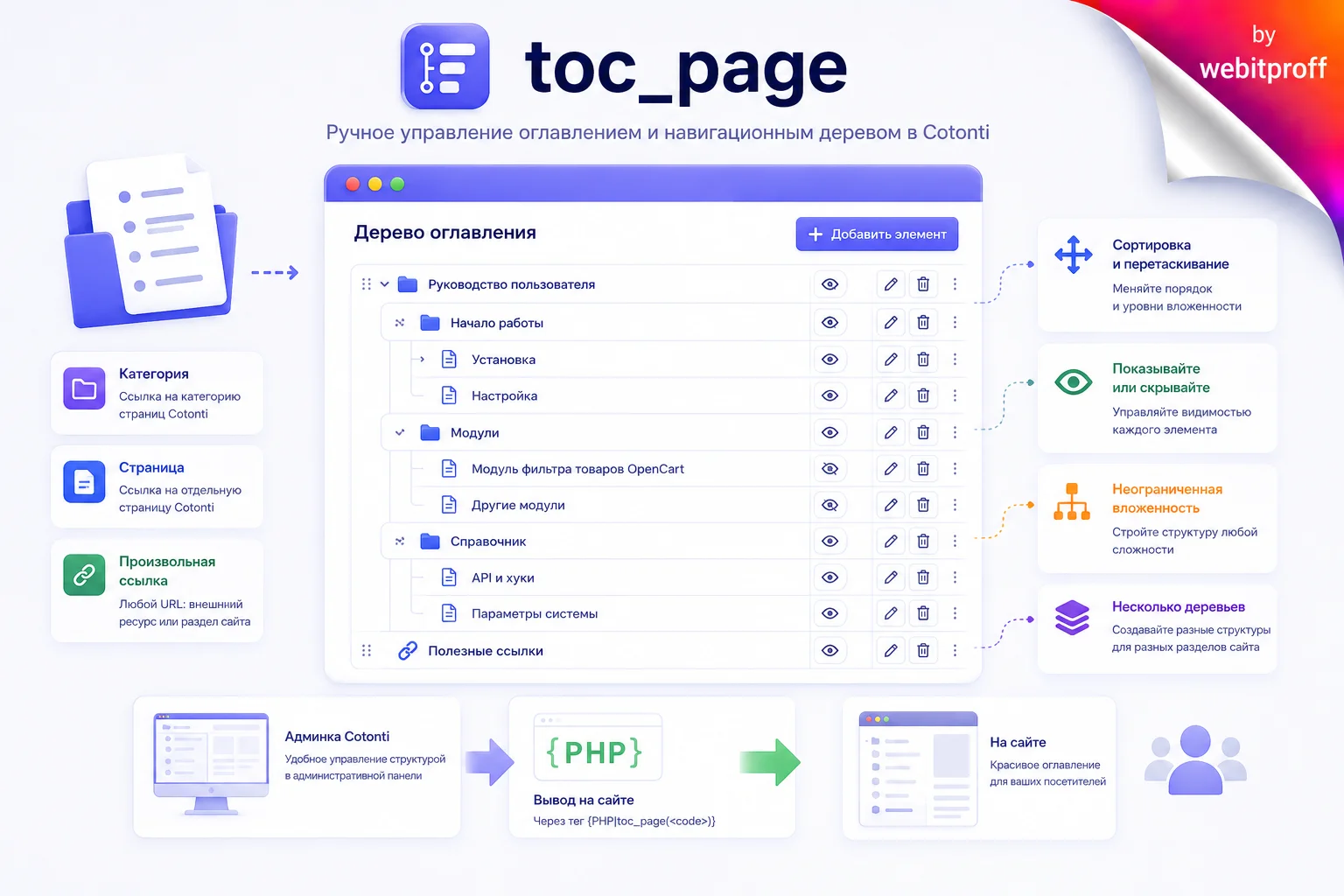
Table of Contents Page plugin for Cotonti
Page Discussion in Telegram
Content author

Offline
Sodium Carbonate
Last logged: 2026-08-23 19:50
- Page published: 2026-08-23 14:48
- Last update: 2026-08-23 15:55
- Language:
 Русский