Complete Guide
What the Plugin Does
- Creates a separate table
cot_xtradbrowpageto store extra fields for pages. Each record is linked to a page viaitempagid = page_idwith cascading delete. - Registers the
cot_xtradbrowpagelocation in the admin panel under "Extensions → Extrafields". - When editing a page, automatically outputs all active extra fields of this location (form fields with the
rxtra_prefix, tags{PAGEEDIT_FORM_XTRA_FIELDNAME}). Saves them on page update. - On the page view, provides tags
{XTRA_FIELDNAME},{XTRA_FIELDNAME_TITLE},{XTRA_FIELDNAME_VALUE}, and a block<!-- BEGIN: XTRA_EXTRAFLD -->to loop through all fields. - In page lists (via
cot_generate_pagetags()), tags with the prefix{LIST_ROW_XTRA_...}are available. - In the
<head>section (header.tagshook), you can use{XTRA_HEADER_FIELDNAME}. - When a page is deleted, the corresponding record in
cot_xtradbrowpageis removed either by cascade or explicitly (page.edit.delete.donehook). - Provides three API functions for manual operations.
Requirements
- Cotonti 0.9.26+
- PHP 8.4+
- The "page" module must be installed
permanent link to the current plugin source code on GitHub
Installation
- Copy the plugin folder to
/plugins/xtradbrowpage. - In the admin panel, go to "Extensions → Plugins" and click "Install".
Installation SQL (executed automatically):
CREATE TABLE IF NOT EXISTS `cot_xtradbrowpage` (
    `itempagid` int UNSIGNED NOT NULL,
    PRIMARY KEY (`itempagid`),
    CONSTRAINT `fk_xtradbrowpage_pages` FOREIGN KEY (`itempagid`) REFERENCES `cot_pages` (`page_id`) ON DELETE CASCADE
) ENGINE=InnoDB DEFAULT CHARSET=utf8mb4 COLLATE=utf8mb4_unicode_ci;
Adding Extra Fields
- In the admin panel: "Extensions → Extrafields".
- Select the
cot_xtradbrowpagelocation (appears after plugin installation). - Create fields of the required types. Allowed types:
input,textarea,select,datetime,double, and any others supported by the Cotonti core.
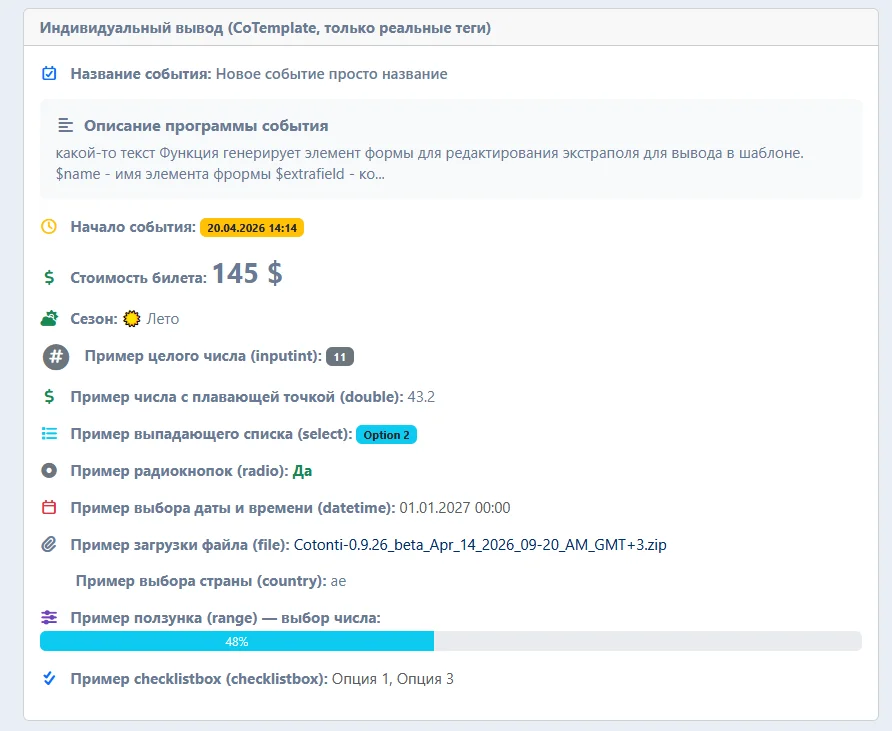
Example Field Set (from database dump)
| Field Name | Type | HTML Template | Variants / Parameters | Description |
| event_name | input | <input class="form-control" type="text" name="{$name}" value="{$value}" maxlength="255"> | Event name | |
| event_description | textarea | <textarea class="form-control" name="{$name}" rows="{$rows}" cols="{$cols}" maxlength="255">{$value}</textarea> | Event description | |
| event_start | datetime | <div class="row g-2"> ... </div> (See the partial SQL Dump) | 2024,2030,d.m.Y H:i | Event start |
| event_ticketprice | double | <input class="form-control" type="text" name="{$name}" value="{$value}" maxlength="255"> | Ticket price | |
| event_seson | select | <select class="form-select" name="{$name}">{$options}</select> | unknown,winter,summer,autumn,spring | Season |
Templates and Tags
1. Edit Form (page.edit.tpl)
Block for automatic output of all fields:
<!-- BEGIN: XTRA_EXTRAFLD -->
<div class="form-group">
    <label>{PAGEEDIT_FORM_XTRA_EXTRAFLD_TITLE}</label>
    {PAGEEDIT_FORM_XTRA_EXTRAFLD}
</div>
<!-- END: XTRA_EXTRAFLD -->
Individual fields (example for event_name):
<div class="mb-3">
    <label>{PAGEEDIT_FORM_XTRA_EVENT_NAME_TITLE}</label>
    {PAGEEDIT_FORM_XTRA_EVENT_NAME}
</div>
2. View Page (page.tpl)
Block for all fields:
<!-- BEGIN: XTRA_EXTRAFLD -->
<div class="extrafield">
    <strong>{XTRA_EXTRAFIELD_TITLE}:</strong>
    <span>{XTRA_EXTRAFIELD_VALUE}</span>
</div>
<!-- END: XTRA_EXTRAFLD -->
Individual field:
<!-- IF {XTRA_EVENT_START} -->
    <p>{XTRA_EVENT_START_TITLE}: {XTRA_EVENT_START}</p>
<!-- ENDIF -->
Values are formatted according to the field type (datetime will be formatted as d.m.Y H:i).
3. Page Lists (page.list.tpl, news.tpl, etc.)
Use tags {LIST_ROW_XTRA_FIELDNAME}, e.g.:
<!-- IF {LIST_ROW_XTRA_EVENT_NAME} -->
    <small>{LIST_ROW_XTRA_EVENT_NAME_TITLE}: {LIST_ROW_XTRA_EVENT_NAME}</small>
<!-- ENDIF -->
These tags are added via the pagetags.main hook inside the cot_generate_pagetags() function.
4. Head Section (header.tpl)
<!-- IF {XTRA_HEADER_EVENT_NAME} -->
    <meta name="event" content="{XTRA_HEADER_EVENT_NAME}">
<!-- ENDIF -->
API for Developers
Functions are located in /plugins/xtradbrowpage/inc/xtradbrowpage.functions.php.
Get all registered fields
$fields = xtradbrowpage_getExtrafields(); // array from Cot::$extrafields['cot_xtradbrowpage']Load record for a page
$data = xtradbrowpage_load($page_id); // returns an associative array with field_name keysSave (INSERT or UPDATE)
$values = [
    'event_name' => 'New event',
    'event_start' => 1715011200, // UNIX timestamp
    'event_ticketprice' => 100.50
];
xtradbrowpage_save($page_id, $values);
Plugin Hooks and Their Purpose
| Hook | File | Action |
| admin.extrafields.first | xtradbrowpage.admin.extrafields.first.php | Adds the location to the extra fields whitelist |
| header.tags | xtradbrowpage.header.tags.php | Assigns XTRA_HEADER_* tags for the current page |
| page.edit.tags | xtradbrowpage.page.edit.tags.php | Outputs fields in the edit form and parses the XTRA_EXTRAFLD block |
| page.edit.update.done | xtradbrowpage.page.edit.update.done.php | Saves the submitted values to cot_xtradbrowpage |
| page.edit.delete.done | xtradbrowpage.page.edit.delete.done.php | Explicitly deletes the record for the page |
| page.tags | xtradbrowpage.page.tags.php | Assigns tags for the view page, parses the XTRA_EXTRAFLD block |
| pagetags.main | xtradbrowpage.pagetags.php | Adds LIST_ROW_XTRA_* tags to $temp_array |
Practical Example: Creating Events
1. Adding Fields
Create fields through the admin panel: event_name, event_description, event_start, event_ticketprice, event_seson with the parameters from the table above.
2. Edit Template
<!-- In page.edit.tpl -->
<div class="card mt-3">
    <div class="card-header">Event Parameters</div>
    <div class="card-body">
        <!-- BEGIN: XTRA_EXTRAFLD -->
        <div class="mb-3">
            <label class="form-label">{PAGEEDIT_FORM_XTRA_EXTRAFLD_TITLE}</label>
            {PAGEEDIT_FORM_XTRA_EXTRAFLD}
        </div>
        <!-- END: XTRA_EXTRAFLD -->
    </div>
</div>
3. View Template
<!-- In page.tpl -->
<!-- IF {XTRA_EVENT_NAME} -->
<div class="event-details">
    <h2>{XTRA_EVENT_NAME}</h2>
    <!-- BEGIN: XTRA_EXTRAFLD -->
    <p><strong>{XTRA_EXTRAFIELD_TITLE}:</strong> {XTRA_EXTRAFIELD_VALUE}</p>
    <!-- END: XTRA_EXTRAFLD -->
</div>
<!-- ENDIF -->
4. List Output
<!-- In page.list.tpl inside LIST_ROWS block -->
<div class="list-item">
    <a href="{LIST_ROW_URL}">{LIST_ROW_TITLE}</a>
    <!-- IF {LIST_ROW_XTRA_EVENT_START} -->
        <span class="date">{LIST_ROW_XTRA_EVENT_START}</span>
    <!-- ENDIF -->
</div>
Field Type Specifics
- datetime: stored as int (UNIX timestamp). In the edit form, dropdowns are provided. On output, formatted according to the
field_params(e.g.,d.m.Y H:i). - select: comma-separated values in
field_variants; the selected value is saved as a string. - double: saved as a floating-point number.
- All fields are escaped on output via
cot_build_extrafields_data()andhtmlspecialchars().
Notes
- The plugin does not add columns to the
cot_pagestable. - If a page is created without immediately saving extra fields, the record in
cot_xtradbrowpagewill appear on the first update of the page via the edit form. - For bulk data insertion, use the
xtradbrowpage_save()API function. - Cache clearing is not required, but if you encounter display issues, clear the cache in the admin panel.
People often order this together with this item: Cotonti CMF: Plugin Installation, Integration, and Adaptation.