Index36 — Modern Theme for Cotonti CMF
Table of Contents
- Introduction
- What is Index36
- Key Features
- Color Palette and Themes
- Sidebar and Its Relocation to the Footer
- Site Header
- Mega Menu Under the Header
- Offcanvas Panels
- Breadcrumbs
- Working with Text Content
- Blockquotes
- Tables
- The "Read More" Block
- Market Module: Online Store and Multi-Vendor
- Market Category Tree
- Compatibility
- Installation
- Pre-Installation Requirements
- Extensions and Integrations
- Theme Customization
- File Map
- Support and Feedback
- License
Introduction
Index36 is a modern, carefully crafted site theme for the Cotonti Siena CMF. It is designed for those who value visual aesthetics, high performance, and administrative convenience at the same time. The theme suits both compact business-card sites and complex portals, blogs, forums, corporate resources, and online stores built on the Market module.
Unlike most Cotonti themes, Index36 is not just a set of templates. It is a full-fledged user interface ecosystem that covers all key scenarios of interaction with the site: navigation, search, content management, profile handling, purchases, comments, and administration.
- Current theme version: 2.0.1
- Last updated: September 29, 2026
- Demo site: https://freelance-script.abuyfile.com
- Source code: https://github.com/webitproff/index36-cotonti-theme
- Cotonti Marketplace page: https://abuyfile.com/ru/market/cotonti/themes/index36
- Support forum: https://abuyfile.com/ru/forums/cotonti/original/skins/index36
- YouTube overview: https://www.youtube.com/watch?v=FKt5SQu4890
What is Index36
Index36 is a site theme — that is, a set of .tpl, .css, .js files, images, and auxiliary PHP files that define the appearance and behavior of the frontend. It does not replace the Cotonti engine itself; it works on top of it, using the standard mechanisms: XTemplate (CoTemplate), the Resources system, the Extensions system, language packs, and module APIs.
The theme's philosophy is simple: maximum functionality with minimal visual noise. The interface is not overloaded with decoration, but every detail — from a button to the theme switcher — is thought through and finished.
Core ideas behind Index36:
- A single navigation hub — the sidebar, which serves as a menu, an admin tool, and a quick-action panel at once.
- Dark and light themes — one-click switching, with the user's choice preserved.
- Responsiveness — equally comfortable on smartphones, tablets, and desktops.
- Modularity — each interface block can be used separately: mega menu, offcanvas, category tree, blockquotes, "Read More" block.
- Clean customization via CSS variables — the color palette is changed in one place.
The theme is not aimed at absolute newcomers to Cotonti. To work with it fully, you need to understand at least the basic syntax of .tpl templates and be able to navigate the theme structure. For those just getting familiar with Cotonti, the CleanCot theme is recommended first — it is simpler and richly commented: https://github.com/webitproff/cot-CleanCot.
Key Features
Below is a summary of what makes Index36 convenient and modern. Each of these features is described in detail in the corresponding section of this document.
- Support for dark and light color schemes, with the user's choice preserved.
- Sidebar relocation to the footer — for proper content order in the DOM and better SEO structure.
- A custom panel selector inside the sidebar, replacing classic tabs.
- A mega menu under the header, expanding via the "More" button.
- Offcanvas panels for the profile, guest menu, and mobile navigation.
- A "Back to top" button — smooth scroll in a single click.
- Perfect Scrollbar — a neat, thin scrollbar in the sidebar and other areas.
- Bootstrap 5.3 support — grids, modals, utilities, components.
- Font Awesome 7 — a modern icon set, including brand icons.
- Select2 — beautiful dropdowns and multi-selects.
- Fancybox — a lightweight lightbox for images and galleries.
- Breadcrumbs with correct truncation of the long last element.
- Styles for text content, blockquotes, tables, and "Read More" blocks.
- Full support for the Market module — online store, multi-vendor, product catalog.
- Market category tree with vertical nesting lines.
- Ready-made templates for the Forums, Pages, Users, PM, PFS, Polls modules.
- Ready-made templates for popular plugins: attacher, comments, contact, i18n, tags, statistics, whosonline, and others.
Color Palette and Themes
Index36 is fully built on CSS variables. This means the site's color scheme is defined in one place, and all interface elements — header, sidebar, cards, buttons, links, borders, shadows — take their values from there.
Two Themes — One Logic
The theme supports two modes:
- Dark (
data-bs-theme="dark") — used by default if the user's browser does not report otherwise. - Light (
data-bs-theme="light") — enabled manually via the switcher button in the header, or automatically if the user's system prefers light mode.
The user's choice is stored in localStorage under the key index-mono-theme. On the next page load anywhere on the site, the chosen theme is applied immediately, without flashing — a synchronous script in <head> handles that.
Variable Structure
All colors are grouped by purpose:
- Backgrounds —
--bg-primary,--bg-secondary,--bg-tertiary,--bg-input. - Text —
--text-primary,--text-secondary,--text-muted. - Accents —
--accent(primary green),--accent-light(hot accent, orange). - Utility —
--border-color,--shadow,--chip-bg,--chip-active,--button-hover. - Links —
--link-color,--link-color-text,--link-hover. - Header and footer —
--header-bg,--footer-bg,--sidebar-bg,--card-bg.
Dark Theme
The dark theme uses a deep graphite background: primary — #16191d, secondary — #1b1e22, tertiary — #212529. Text is light: #e9ecef for primary, #adb5bd for secondary, #6c757d for muted. The accent is a rich green #137C54, the hot accent is orange #ff5100.
Light Theme
In the light theme, the background is soft, not pure white: #e9eef5 for the page and #ffffff for cards and the sidebar. This reduces contrast and makes long reading more comfortable. Primary text — #212529, secondary — #495057, muted — #868e96. The accents are the same as in the dark theme, so users perceive the brand consistently in both modes.
A Single Hover Accent
One of the key decisions — a single hover color for links across all themes: orange #ff5100. This creates a visual rhythm and makes the interface feel alive. All links in text content, navigation, cards, and menus respond to hover the same way.
Where to Change Colors
All variables are declared in themes/index36/css/header.last.css at the very top: first for :root, [data-bs-theme="dark"], then overrides for [data-bs-theme="light"]. Changing the values in these two blocks updates the entire theme's color palette.
Sidebar and Its Relocation to the Footer
Historically, in Cotonti themes, the sidebar is placed in header.tpl, before the main content. This is not always correct from an SEO standpoint: search engines consider content that comes first in the DOM to be more important. If the header and side menus come before the article, they carry more weight than the article itself.
Index36 solves this problem: the sidebar is moved into footer.tpl, after <main>. In the DOM it comes after the main content, but visually it stays on the left thanks to the rule:
.layout > .sidebar { order: -1; }
.layout > .main-content { order: 0; }
This delivers several advantages at once:
- Content is read first — both by search engines and by screen readers.
- Scrolling works more correctly — on mobile, the sidebar does not interfere with the main flow.
- The theme structure becomes more logical — all auxiliary blocks (offcanvas, modals, sidebar) are gathered in the footer instead of being scattered between the header and the content.
What's Inside the Sidebar
The Index36 sidebar is the central hub for navigation and administration. It contains:
- The panel selector — a custom dropdown replacing classic tabs. The user opens the list and chooses a section: Market, Pages, Forums, Users, Plugins, Additional elements.
- The content of the selected panel — contextual. For example, the Market panel shows the category tree and a link to seller vendors; the Pages panel shows search and article structure; the Users panel shows groups and admin tools.
- The close button — shown only on mobile, so the sidebar can be easily collapsed.
- A custom scrollbar — Perfect Scrollbar with a thin track that appears only on hover.
How It Works on Desktop
On desktop, the sidebar is attached to the left edge and does not scroll separately from the page — its vertical position is fixed, letting it be used as an always-accessible panel. The hamburger button in the header hides/shows the sidebar, and the state is saved in localStorage under the key sidebar-hidden.
How It Works on Mobile
On mobile, the sidebar becomes a slide-out panel on the left, 80% of the screen width (but no more than 380px). It opens by tapping the hamburger, closes by tapping outside the panel, via the close button, by pressing Escape, or by tapping any link inside (except chevron toggles). The background is dimmed by an overlay.
Sidebar Close Button
The "Collapse" button is located outside .ps-container, so it does not scroll with the content. It is always visible at the bottom of the sidebar on mobile. This allows closing the panel with a single touch, no matter how far the user has scrolled through the content.
Site Header
The Index36 header is a compact yet functional 56px bar, pinned to the top of the screen (position: sticky; top: 0). It has three zones:
- Left — hamburger button (mobile only) and logo.
- Center — main horizontal menu (desktop only).
- Right — action block: language switcher, theme button, login button or user profile.
Logo
The logo is a combination of an image ({PHP.R.app-logo}) and text ({PHP.cfg.maintitle}). If the site name is too long and does not fit the allotted area, it is truncated with an ellipsis, without pushing the central menu to the right. This is implemented via flex: 1 1 0 on the .header-left container and min-width: 0 on the logo itself.
Central Menu
The main menu is built in header.tpl and contains the links:
- Home — active when
{PHP.env.ext} == 'index'. - News — when the
pagemodule is present. - Forums — when the
forumsmodule is present. - Users — when the
usersmodule is present. - Contacts — when the
contactplugin is present. - More — a custom button that opens the mega menu.
The active item is highlighted with a green bottom border (var(--accent)). The "More" button behaves like a regular link — when the mega menu opens, it gets the same border and changes color.
Right Block
The right block (header-actions) contains:
- Language switcher — a dropdown menu with flags (RU / EN / UA). The active language is displayed next to the icon.
- Theme switch button — a moon icon (dark) or sun icon (light). Clicking changes the theme and icon, and saves the choice.
- For guests — an accent "Login" button that opens an offcanvas.
- For users — a private messages icon with an unread counter, and an avatar that opens the right profile offcanvas.
Mega Menu Under the Header
The mega menu is a wide dropdown that opens under the header via the "More" button in the main horizontal menu. It allows fitting additional navigation without bloating the header itself.
Structure
The mega menu has two zones:
- Left — a two-column grid with navigation items. Each item contains an icon, a title, and a subtitle. By default, these are "For Customers" (Discounts, Delivery, Guarantees) and "Company" (About, Blog, Partners).
- Right — an accent block with a call to action: a "Featured" badge, a title, short text, and a button.
How It Opens
The mega menu is absolutely positioned under the header (top: 100%). It opens by clicking the "More" button, closes by clicking outside the menu, pressing Escape, or clicking any link inside.
Accessibility
The "More" button has aria-expanded and aria-controls attributes, which are synchronized with the menu state. This makes the interface correct from an accessibility standpoint.
Responsiveness
On tablets and mobile, the mega menu is fully hidden — at these breakpoints, the "More" button is also hidden, since the main horizontal menu does not exist at these widths.
Offcanvas Panels
Offcanvas is a Bootstrap side-slide panel used in Index36 for several purposes. The theme has three offcanvas panels:
1. Guest Offcanvas (right)
Opens via the "Login" button for unregistered users. Contains:
- A login link (
{PHP|cot_url('login')}) that opens the auth modal. - A registration link.
- A password recovery link.
- A block of buttons for third-party login (
hybridauth, if active).
The offcanvas footer contains information about the engine used, PHP version, MySQL version, and legacy mode status.
2. User Profile (right)
Opens by clicking the avatar in the header. Contains:
- The user's first and last name (if filled in), otherwise the login.
- A link to the admin panel (for the main administrator).
- A link to the profile.
- A link to the profile settings.
- Private messages (if the module is active).
- Personal files (if the PFS module is active).
- Notifications (if any) — an expandable list.
- A logout button.
3. Mobile Navigation (right)
In future theme versions, this is planned to host the full menu for mobile users. Currently, this panel can be used as additional navigation space.
Design Consistency
All three offcanvas panels share a consistent look:
- Links inside look like sidebar items — with a hover background, rounding,
--text-secondarycolor and a transition to--text-primary. - Dividers (
<hr>) use--border-colorwith reduced opacity. - Offcanvas panels are raised above the header by
z-index, so they are not overlapped by it.
Breadcrumbs
Breadcrumbs are a navigation chain showing the path to the current page from the home page. In Cotonti, their output is handled by a set of resource strings in index36.php, and their appearance by styles in header.last.css.
How It Works
Cotonti resource strings define how each breadcrumb element is rendered:
breadcrumbs_container— the wrapper around the whole chain.breadcrumbs_separator— the separator between elements (the theme uses>from Cotonti's config).breadcrumbs_link— a clickable element.breadcrumbs_last— the last element (current page).
Truncating the Long Last Element
One problem with classic breadcrumbs is a long current page title that overflows the container. Index36 solves this: the last element is wrapped in <span class="breadcrumb-last">, which can shrink and be truncated with an ellipsis.
All previous elements (links and separators) have a fixed width and do not shrink. This means truncation affects only the current page, and the path to it is always fully visible.
Colors and Styles
Breadcrumb links use --text-secondary with a transition to --link-hover on hover. The last element is --text-primary and semi-bold. Font size — .85rem on desktop and .78rem on mobile.
Working with Text Content
For text content — articles, product descriptions, forum posts — the theme provides a special wrapper class: .text-content. It imposes a uniform behavior on all elements inside:
- Links —
--accentcolor (green), on hover--accent-light(orange). Underlining appears only on hover, to avoid visual noise. - Headings — retain the site's typography but scale depending on the device.
- Lists — standard markers replaced with neat dots, indents aligned.
- Images — automatically adjust to the container width, do not overflow.
- Code — inline code styled with
--chip-bgbackground and rounding; block code with a monospaced font. - Tables — do not overflow the parent; if necessary, they get horizontal scroll.
Using .text-content is a simple and universal way to ensure a uniform look for content anywhere on the site. Just wrap the text output in <div class="text-content">...</div>.
Blockquotes
Quotes in forums and articles are a design topic on their own. In Index36 they appear as a self-contained block with several visual accents:
- Background — muted (
--bg-tertiary) to set the quote apart from regular text. - Left vertical line — accent-colored (
--accent), as with classic quotes. - Rounding — only on the right corners; the left ones stay straight under the line.
- Inner padding — increased on the left so the text does not stick to the line.
- Text color — secondary (
--text-secondary) so the quote differs from a regular paragraph. - Italics disabled — for better readability in the dark theme.
Author Anchor
If the quote begins with an anchor like #444 (post number) and an author name, the anchor is styled as a badge with an accent background and white text, rounded to 999px. This makes the quote look like a messenger message and easily identifiable visually.
Nested Quotes
Nested blockquote elements get a more muted background and a gray vertical line — so they visually differ from the top-level quote.
Tables
Tables in Cotonti (Pages, Market, Forums modules) can be of various kinds: flat lists, bordered cells, tables with icons. In Index36, table styling is grouped and brought to a modern look.
Base Styling
All tables get:
- Rounded corners — 12px.
- Shadow — soft, separating the table from the background.
- Separate borders (
border-collapse: separate) — for correct rounding. - Background — slightly darker in the dark theme, slightly light in the light theme.
- Cell padding — 12–14px, comfortable to read.
- Zebra striping — even rows slightly darker.
- Row hover — highlighting on hover.
Mobile Adaptation
On narrow screens, tables do not break; instead, they get horizontal scroll. This uses the .table-wrap or figure.table wrapper. Font and padding are reduced to make the table more compact.
Special Cotonti Classes
The classes table.flat, table.main, table.cells, table.list, table.fico are overridden with modern typography, spacing, and theme colors. The classes .coltop, .centerall, .valid get neat backgrounds and alignment.
Inside Text Content
The case where a table is inserted into .text-content is handled separately. Here the table does not overflow the parent, and code blocks inside cells (<pre>) wrap lines — this eliminates horizontal breakage.
The "Read More" Block
Long articles, product descriptions, and forum posts often take up a lot of space and turn a page into an endless scroll. For such cases, Index36 provides a universal "Read More" block.
How It Works
Any text fragment can be wrapped in a .readmore-block container, which contains:
.readmore-body— the text with the content..readmore-actions— a divider with the button.
The readmore.js script automatically:
- Counts the length of the plain text.
- If it exceeds the limit (750 characters by default) — collapses the block to 680px.
- Adds a fade gradient at the bottom so the text looks smoothly cut.
- Shows the "Read More" button.
- On click, smoothly expands the block to full height and changes the button text to "Collapse".
Smoothness
The expansion is animated via height between two concrete values — this achieves a truly soft transition, unlike max-height with none. Speed — 450ms, curve — cubic-bezier(0.4, 0, 0.2, 1).
Universality
The block can be applied in any template:
- in a product card (
market.tpl), - in an article (
page.tpl), - in a forum post (
forums.posts.tpl), - in any other place.
The script picks up all .readmore-block blocks on the page independently.
Button Styling
The button automatically adapts to the theme:
- In the light theme —
#dee2e6background, dark text. On hover —#c8cdd3background. - In the dark theme —
#2a2e35background, light text, thin border. On hover —#3a3e45background, more prominent border.
The button is placed between two horizontal dividers (<hr>), giving the block visual closure.
Market Module: Online Store and Multi-Vendor
Index36 fully supports the Market module for Cotonti — a paid extension that turns a site into a full-fledged online store or multi-vendor platform.
What the Market Module Provides
Market adds to Cotonti:
- A product catalog with category hierarchy.
- A product card with images, description, price, specifications.
- Cart and order processing.
- Seller vendor pages with individual storefronts.
- Payment integrations (
payordersmarket). - A review system (
marketreviews). - Multi-categories (
multicatmarket). - Additional product fields (
xtradbrowmarket). - Additional owner fields (
xtradbrowusers).
What Index36 Implements
The theme already provides templates for:
market.tpl— product card.market.list.tpl— product list in a category.market.tree.sidebar.tpl— category tree in the sidebar.market.tree.list.tpl— category tree in the product list.market.add.tpl— add product form.market.edit.tpl— edit product form.
All templates are adapted to the Index36 design and automatically pick up theme colors.
Multi-Vendor
Multi-vendor is a mode where different sellers can sell on one site, each with their own storefront page. Index36 implements:
- Seller storefront page (
m=vendors). - Seller's product list.
- Additional seller fields (social links, contacts).
- Integration with the reviews plugin.
Relationship with Users
The Market module is closely tied to the Users module. Index36 implements:
- Seller avatar in the product card.
- Link to the seller's profile.
- Seller online status.
- Last login date.
- Additional seller fields (phone, messengers, social links).
Price with Conversion
In the product card, the price can be specified in USD but displayed in the user's currency. This is handled by the marketcurrencyswitcher plugin and a small converter script in market.rc.php.
Cart and Checkout
If the payordersmarket plugin is active, a "Add to Cart" button appears in the product card template. After adding — an "Item added" message. If the item is already in the cart — an "In Cart" label with a checkmark. For guests — a modal window suggesting authorization.
Market Category Tree
One of the key parts of an online store is category navigation. In Index36, the Market category tree looks like a neat list with visual indentation.
Styling Features
- Root level — a flat list of categories.
- Nested levels — a vertical line on the left, showing belonging to the parent category.
- Left indent — 12px per nesting level.
- Chevron —
fa-chevron-lefticon, rotating -90° when expanded. - Smooth rotation — 200ms.
How Expansion Works
Each category with subcategories is a .list-group-item with a .toggle-subcats button. Clicking it expands the #sub-<level>-<jj>-<id> block, containing subcategories. Expansion via Bootstrap Collapse, with built-in animation.
Active Category and Its Path
When navigating to a URL with the ?c=<code> parameter (or via a SEF path in urleditor mode):
- the active category link gets the
activeclass and is highlighted with the accent color; - all
collapseancestors of the active category are automatically expanded, so the user sees the path.
This is handled by the marketTreeScript.js script (or marketTreeScriptURLEditor.js in SEF mode). The scripts do not touch the DOM structure, work with all .market-tree on the page, and support storing expanded categories in localStorage under the key market-tree-open.
Markup
The tree is built on the standard Bootstrap .list-group component. Element backgrounds are transparent so the tree sits on the sidebar or card background. Links use --text-secondary with a transition to --text-primary.
Compatibility
Index36 is fully compatible with:
- Cotonti Siena CMF v0.9.26 and higher (v1.0.0+ recommended).
- PHP 8.4+ (PHP 8.5 recommended).
- MySQL 8.0+ (MySQL 8.4 recommended).
- Bootstrap 5.3.8.
- Font Awesome 7.2.
The Theme Supports All Standard Cotonti Modules
- Pages (articles, news).
- Forums (forums).
- Users (users).
- PM (private messages).
- PFS (personal files).
- Polls (polls).
- Market (online store, if installed).
Plugins with Templates Already Available
- attacher — attachments to pages and posts.
- comments — comments.
- contact — feedback form.
- i18n — content multilingual support.
- indexnews — news on the home page.
- recentitems — recent updates.
- search — search.
- statistics — statistics.
- tags — tags.
- treecatspage — page category tree.
- whosonline — who is online.
- market (see the Market section above).
- marketreviews — product reviews.
- marketprofilter — filters.
- seomarketpro — SEO for products.
- tgm4market — Telegram discussions.
- payordersmarket — cart and orders.
What Needs Attention
- The theme does not support Cotonti's legacy mode. Sites using old tags in templates will require migration.
- For icons to work correctly, Font Awesome 7.2 must be installed in
/lib/fontawesome. - For correct theme operation, it is recommended to enable the "Force the default theme for all users" option in Cotonti settings.
Installation
Step 1. Download
Download the latest theme archive from GitHub: https://github.com/webitproff/index36-cotonti-theme/archive/refs/heads/main.zip.
The archive size is less than 1 MB.
Step 2. Extract
Extract the archive and locate the themes/index36 folder.
Step 3. Upload
Copy the index36 folder into the themes/ directory of your Cotonti site:
public_html/themes/index36/FileZilla or another FTP client is recommended. After uploading, make sure all files were transferred correctly.
Step 4. Configure config.php
Open the file datas/config.php in the site root and find the line:
$cfg['defaulttheme'] = 'nemesis';Replace with:
$cfg['defaulttheme'] = 'index36';Save the file and upload it back to the server.
Step 5. Activate in Admin Panel
Go to Site Management → Configuration → Themes and:
- Enable "Force the default theme for all users" — Yes.
- Enable "Home link in the breadcrumb" — Yes.
- Leave "Separator" empty.
Save changes.
Step 6. Extrafields (optional)
To display the user's first and last name in the profile:
- Site Management → Miscellaneous → Extrafields → cot_users.
- Add the field
firstname(typeinput, description "First name"). - Add the field
lastname(typeinput, description "Last name").
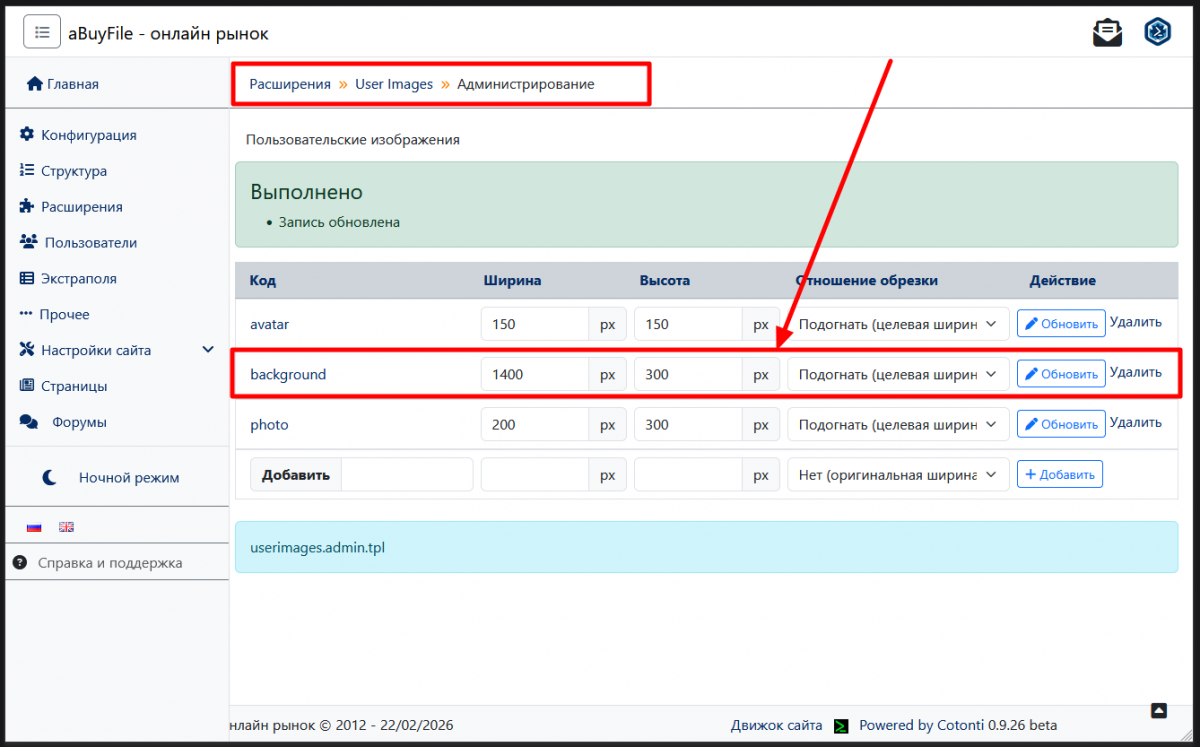
Step 7. Profile Background (optional)
Site Management → Extensions → User Images → Administration:
- In the code field:
background. - Width:
1400. - Height:
300. - Ratio:
Fit.
Step 8. Font Awesome
Must be installed before starting work. See the "Requirements" section.
Step 9. Additional Plugins (optional)
Through the Cotonti marketplace, you can install additional plugins: category tree, reviews, filters, etc.
Once installed, the theme is ready to use.
Pre-Installation Requirements
Font Awesome 7.2
The icon library must be located in /lib/fontawesome. Four files are sufficient:
/lib/fontawesome/css/all.min.css
/lib/fontawesome/webfonts/fa-brands-400.woff2
/lib/fontawesome/webfonts/fa-regular-400.woff2
/lib/fontawesome/webfonts/fa-solid-900.woff2
Download: Font Awesome Free 7.2.0. If asked for an email — ignore, click "Never mind. Continue with downloading".
Forced Default Theme
In Cotonti admin panel: Site Management → Configuration → Themes → "Force the default theme for all users" → Yes.
Without this option, the theme may not work correctly for users who have selected a different theme in their profile.
Extensions and Integrations
Index36 is ready to integrate with popular Cotonti extensions.
Payment and Marketing
- payordersmarket — cart, orders, file downloads.
- marketcurrencyswitcher — currency conversion.
- seomarketpro — SEO markup for product cards.
- marketreviews — reviews with rating.
- marketprofilter — filters by parameters.
- tgm4market — product discussion in a Telegram channel.
User-Related
- xtradbrowusers — additional user fields.
- userimages — avatars and profile backgrounds.
- whosonline — online status.
- hybridauth — third-party login.
Content-Related
- attacher — attachments to pages and posts.
- comments — comments with a threaded structure.
- tags — tag cloud.
- i18n — content multilingual support.
- treecatspage — page category tree.
- indexnews — news block on the home page.
- recentitems — recent publications.
Analytical
- statistics — site statistics.
- whosonline — visitors online.
All theme plugins use standard Cotonti resource strings and correctly embed into the Index36 design.
Theme Customization
Index36 is designed so that changes to it are as simple and safe as possible.
Changing the Color Palette
All colors are exposed as CSS variables at the top of css/header.last.css. Just change the values in the :root, [data-bs-theme="dark"] block and the [data-bs-theme="light"] block to update the whole site's palette.
Adding Menu Items
The main menu is in header.tpl. To add an item, copy an existing <li> and change the URL and text.
Mega Menu
The mega menu content is in header.tpl in the #megaMenu block. Replace the placeholder links with your own. Columns can be added or removed.
Sidebar
Sidebar panels are in footer.tpl. To add a new panel, copy an existing <div class="panel-content">, give it a unique id="panel-<name>", and add a corresponding item in the selector.
Styles
All custom styles are in css/header.last.css. The file is included last in <head>, so its rules take priority over the theme's base styles.
Scripts
The theme's own scripts are in js/. Scripts that must run before others are included via header.first.js. Theme scripts serving specific components (sidebar, theme, tabs) are included at the end of footer.tpl.
File Map
index36/                         # Main theme folder
├── assets/                      # Static resources (libraries, styles, scripts)
│   ├── fancybox/                # Lightbox / modal gallery
│   ├── jquery/                  # jQuery
│   ├── perfect-scrollbar/       # Custom scrollbar
│   └── select2/                 # Dropdown lists
├── css/                         # Theme styles
│   ├── default.css              # Base style set
│   ├── header.last.css          # Overrides included last
│   └── modalbox.css             # System modal window styles
├── img/                         # Images, icons, flags, placeholders
│   └── flags/                   # Language flags (webp)
├── inc/                         # Additional HTML blocks
├── js/                          # Custom theme scripts
│   ├── header.first.js          # Scripts included early
│   └── js.js                    # Main JS
├── modules/                     # Cotonti module templates
│   ├── forums/                  # Forum
│   ├── page/                    # Pages and articles
│   ├── pfs/                     # Personal files
│   ├── pm/                      # Private messages
│   ├── polls/                   # Polls
│   └── users/                   # Users
├── plugins/                     # Plugin templates
│   ├── attacher/
│   ├── comments/
│   ├── contact/
│   ├── i18n/
│   ├── indexnews/
│   ├── recentitems/
│   ├── search/
│   ├── statistics/
│   ├── tags/
│   ├── treecatspage/
│   └── whosonline/
├── error.403.tpl                # 403 error
├── error.404.tpl                # 404 error
├── error.tpl                    # Common error template
├── footer.tpl                   # Page bottom + sidebar
├── header.tpl                   # Site header + main menu + mega menu
├── index.tpl                    # Home page
├── index36.en.lang.php          # English localization
├── index36.functions.php        # Custom functions
├── index36.php                  # Theme entry point
├── index36.rc.php               # Resource inclusion
├── index36.resources.php        # System string overrides
├── index36.ru.lang.php          # Russian localization
├── index36.ua.lang.php          # Ukrainian localization
├── login.tpl                    # Login page
├── message.tpl                  # System messages
├── plugin.tpl                   # Universal plugin template
├── popup.tpl                    # Popup windows
└── warnings.tpl                 # Notices
Support and Feedback
- Demo site: https://freelance-script.abuyfile.com
- GitHub: https://github.com/webitproff/index36-cotonti-theme
- Support forum: https://abuyfile.com/ru/forums/cotonti/original/skins/index36
- Marketplace page: https://abuyfile.com/ru/market/cotonti/themes/index36
- YouTube overview: https://www.youtube.com/watch?v=FKt5SQu4890
- Installation guide on the forum: https://abuyfile.com/ru/forums/cotonti/original/skins/index36/topic188
- Font Awesome guide: https://abuyfile.com/ru/forums/cotonti/original/skins/index36/topic185
The theme author is webitproff (https://github.com/webitproff).
Support is provided via the forum and GitHub. The author answers questions about installation, customization, and module integration. Paid enhancements are available.
License
Index36 is distributed under the BSD license. This means:
- The theme is free to use.
- The theme is free to distribute.
- Copyright remains with the author (webitproff).
- Modifications are welcome, but with copyright preserved.
Using the theme on commercial projects is allowed without restrictions.
Conclusion
Index36 is a modern theme for Cotonti CMF, combining aesthetics, functionality, and attention to detail. It suits both small sites and large portals and online stores based on the Market module. Its strengths:
- Clean DOM structure and improved SEO markup thanks to the sidebar's relocation to the footer.
- A unified color palette on CSS variables with dark and light theme support.
- Thoughtful interfaces: header, mega menu, sidebar, offcanvas.
- Ready-made styles for text content, blockquotes, tables, and the "Read More" block.
- Full support for the Market module — catalog, storefront, category tree, cart.
- Ready-made templates for all key Cotonti modules and popular plugins.
If you are looking for a theme that is at once modern, fast, and convenient for both users and administrators, Index36 is one of the best choices for Cotonti.
The latest source code is always available on GitHub: https://github.com/webitproff/index36-cotonti-theme.
Happy installation and a beautiful Cotonti site!
Buy Index36: Modern Theme for Cotonti CMF at low prices. The online store offers to order Index36: Modern Theme for Cotonti CMF, view the full description, detailed specifications, product photos and current discounted prices