Extrafields Users Custom — Complete Guide
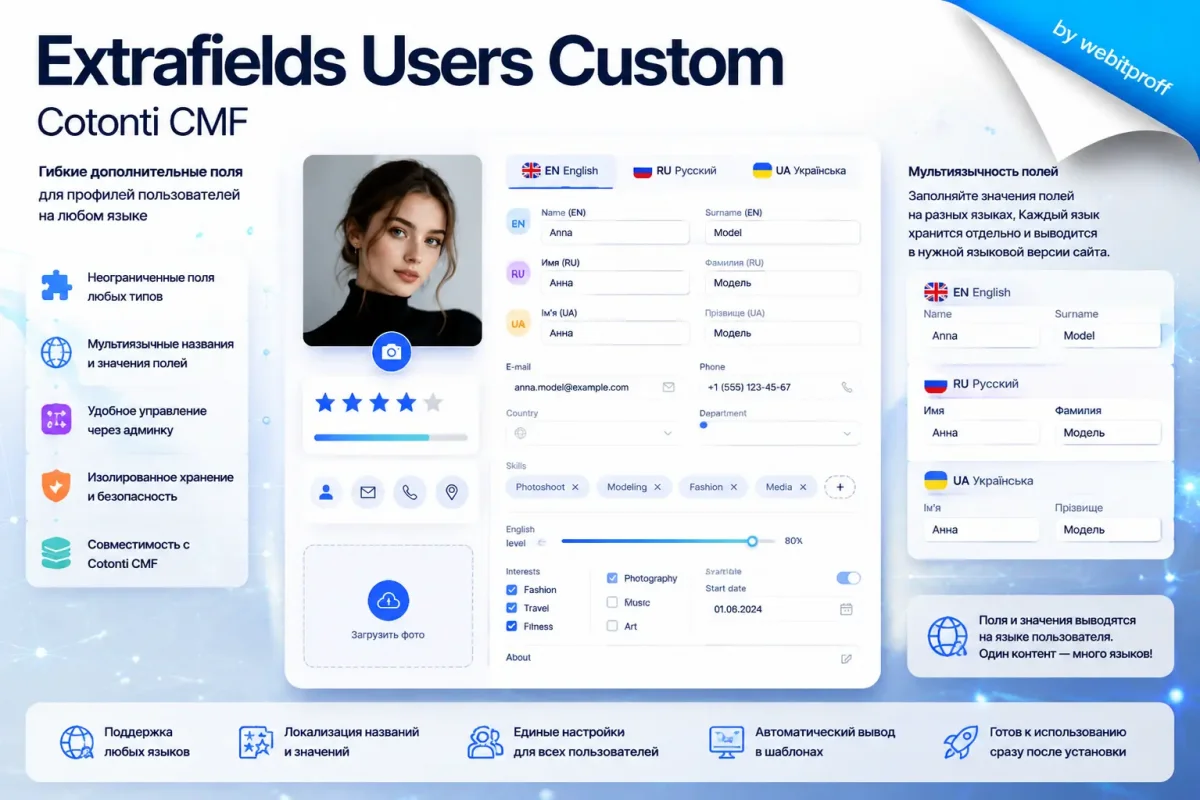
Extrafields Users Custom (code xtradbrowusers) is a Cotonti CMF plugin that allows adding an unlimited number of extra fields to user profiles. All data is stored in a separate table cot_xtradbrowusers, leaving the core cot_users table untouched. This guarantees complete isolation, easy maintenance, and automatic cleanup when a user is deleted.
The plugin is compatible with Cotonti v1.0+, PHP 8.4+, MySQL 8.4+, Bootstrap 5.3+. After installation you immediately get 15 demo fields of all supported types, ready to use.
Source code: github.com/webitproff/xtradbrowusers-cotonti
Download latest release: github.com/webitproff/xtradbrowusers-cotonti/releases
1. What this plugin is and why you need it
Extrafields Users Custom is a dedicated extension that adds arbitrary fields to user profiles without altering the standard cot_users table. All extra data is stored in the isolated cot_xtradbrowusers table, linked to the main user record via a foreign key with cascading delete (ON DELETE CASCADE).
This approach is essential for sites where a profile is not just an account, but a showcase of a specialist, a client card, or a community face: forums, online stores, freelance marketplaces, corporate portals. You get flexible expansion without touching the system core.
Key benefits: core untouched, full data isolation, automatic integrity when a user is deleted, and a quick rollback on uninstall.
2. What you get out of the box
Right after installation the administrator receives 15 demo fields covering all types supported by the Extrafields API: input, textarea, datetime, double, select, inputint, radio, file, country, range, checklistbox. This lets you quickly evaluate which type fits a particular task and see the plugin in action immediately.
3. Who will benefit and why
The plugin solves the task of extending a profile when the standard set of fields is not enough. For communities – statuses, interests, social links. For online stores – extra contacts, customer categories, payment details. For freelance platforms – skills, portfolios, resumes, qualification levels. All fields are managed through the standard “Administration → Extensions → Extrafields” interface, and their values are automatically available in registration, profile editing, public card, and user list templates. The header.tags hook also allows output into page meta tags.
4. Step‑by‑step installation
- Download the latest plugin version from GitHub Releases.
- Unpack the archive and upload the
xtradbrowusersfolder to your site’splugins/directory. Make sure thatxtradbrowusers.setup.phpis accessible at/plugins/xtradbrowusers/xtradbrowusers.setup.php. - Log in to the Cotonti admin panel and go to “Extensions” (URL depends on configuration:
/admin/extensions,/ru/admin/extensionsoradmin.php?m=extensions). - Find the Custom Extrafields Users plugin (code
xtradbrowusers) and click “Install”. The system will register the plugin in thecot_core,cot_authandcot_pluginstables, create thecot_xtradbrowuserstable, add 15 demo fields, and a folder for file uploads. - After installation navigate to “Administration → Extensions → Extrafields”, select the
cot_xtradbrowuserstable – you will see the ready‑to‑use fields.
5. Demonstration fields
The following fields are created during installation (all are optional):
- phone_extra (input) – Additional phone
- about_extra (textarea) – About me
- hire_date (datetime) – Hire date
- salary (double) – Salary
- department (select) – Department (Not specified, IT, Marketing, Sales, Support)
- experience_years (inputint) – Experience (years)
- skill_level (select) – Skill level (Junior, Middle, Senior, Lead)
- has_car (radio) – Car availability (Yes/No)
- last_promotion (datetime) – Date of last promotion
- resume_file (file) – Resume (jpg, png, pdf, zip)
- residence_country (country) – Country of residence (default Ukraine)
- english_level (range) – English level (0–100, default 50)
- interests (checklistbox) – Interests (Sport, Music, IT, Travel)
- work_schedule (select) – Work schedule (Full‑time, Shift, Remote, Flexible)
- emergency_contact (input) – Emergency contact
6. Plugin file structure and purpose
The plugin consists of several groups of files, each executed at a strictly defined moment thanks to the Cotonti hook system. All files except setup.php contain a header with the hook name, registered in the cot_plugins table.
Registration and initialization
xtradbrowusers.setup.php – metadata file, processed once at installation. Does not contain per‑request PHP code. Declares code, name, dependencies, access rights. Based on it the system creates records in cot_core, cot_auth and scans the plugin folder to register hooks in cot_plugins.
xtradbrowusers.global.php (hook global) – executed on every request, loads language files and API functions. The table xtradbrowusers is registered here via inc/xtradbrowusers.functions.php.
Installation and removal
Files in the setup/ folder handle creation and deletion of the table, demo fields, and the file upload folder. uninstall.php completely cleans the extrafield registry and file system.
Integration with the extrafield management UI
xtradbrowusers.extrafields.php (hook admin.extrafields.first) adds the cot_xtradbrowusers table to the admin whitelist, allowing field management through the standard “Extrafields” section.
Profile editing by the user
xtradbrowusers.users.profile.tags.php (hook users.profile.tags) – assigns {USERS_PROFILE_XTRA_…} tags in the users.profile.tpl template.
xtradbrowusers.users.profile.update.done.php (hook users.profile.update.done) – saves form values into the plugin table.
Editing by the administrator
xtradbrowusers.users.edit.tags.php (hook users.edit.tags) – tags for the admin form (users.edit.tpl).
xtradbrowusers.users.edit.update.done.php (hook users.edit.update.done) – saving during admin editing.
Public profile
xtradbrowusers.users.details.tags.php (hook users.details.tags) – tags for the public page (users.details.tpl), including country name support.
User list
xtradbrowusers.users.loop.php (hook users.loop) – {USERS_ROW_XTRA_…} tags for each row of the list.
xtradbrowusers.usertags.php (hook usertags.main) – integrates into the central user tag generator, making fields available in any context (forums, posts, widgets).
Registration
xtradbrowusers.users.register.tags.php (hook users.register.tags) and …register.add.done.php – tags in the registration form and saving after successful registration.
User deletion
xtradbrowusers.users.delete.done.php (hook users.delete.done) – deletes field files and the record from cot_xtradbrowusers.
Additional integrations
xtradbrowusers.header.tags.php (hook header.tags) – allows outputting extra field data in <title> and meta tags.
7. Managing extra fields in the admin panel
Go to “Administration → Extensions → Extrafields” and select the cot_xtradbrowusers table. You will see a list of 15 fields and a form to add a new one. Each field has attributes: name, type, HTML template, variants, parameters, default value, mandatory flag, parser, and description.
Available types: input, textarea, select, radio, checkbox, datetime, country, file, checklistbox, range, inputint, currency, double. For dropdowns and radio buttons list variants separated by commas; for a range provide min and max; for a date provide year range and format. The default value for datetime is a UNIX timestamp.
Example of creating a “Favorite programming language” field: name fav_language, type select, variants Not specified,JavaScript,Python,PHP,Rust, default Not specified. The new field immediately appears in user profiles.
8. Field output: admin editing (users.edit.tpl)
The users.edit.tags hook provides the {USERS_EDIT_XTRA_FIELDNAME} and {USERS_EDIT_XTRA_FIELDNAME_TITLE} tags, as well as the generic {USERS_EDIT_XTRA_EXTRAFLD} and _TITLE for looping.
To display all fields at once, insert a block with a plugin active check and the <!-- BEGIN: XTRA_EXTRAFLD -->…<!-- END: XTRA_EXTRAFLD --> loop into users.edit.tpl. For individual placement use specific tags. After saving, data is stored in the plugin table and becomes available to other templates.
9. Field output: user profile editing (users.profile.tpl)
Similar to the admin form but with the USERS_PROFILE_XTRA_ prefix. Both cyclic and individual output are supported. Always wrap output in a plugin activity check.
10. Field output: public profile (users.details.tpl)
Here fields are displayed as ready‑to‑read values, not input elements. Tags available: {USERS_DETAILS_XTRA_FIELDNAME} (formatted), _VALUE (raw), _TITLE. For country fields the country name is accessible. Dates can be formatted with the cot_date filter. Use a loop or individual tags.
11. Field output: user list (users.tpl)
Inside the <!-- BEGIN: USERS_ROW --> loop the tags {USERS_ROW_XTRA_…} are available. It is recommended to output only key fields to avoid overloading cards. The plugin does not provide a group loop in this template – only individual tags.
12. Field output: registration (users.register.tpl)
The registration form does not load existing data, but preserves entered values on validation errors. Tags {USERS_REGISTER_XTRA_…} are available. You can output all fields with a loop or selectively.
13. Group (loop) output
When there are many fields, it is convenient to use a single <!-- BEGIN: XTRA_EXTRAFLD --> block. It works in the edit, profile, details, register, and user list templates, automatically substituting the field’s label and element. Each hook assigns the generic XTRA_EXTRAFLD and XTRA_EXTRAFLD_TITLE tags, and the template loop iterates over all fields.
Important: in editing forms (edit, profile, register) you must not use both individual tags and a loop for the same field – this would duplicate name attributes in HTML and cause data loss on submit. Choose one approach. On public pages duplication does not cause save errors, but for code clarity it’s still best avoided.
Recommendation: in forms use a loop; on the public profile card use individual output for customization; in the user list use only individual tags.
14. Localization of extra fields
The plugin is fully compatible with the Cotonti translation system. Field titles are looked up using the keys $L['xtra_fieldname_title'] or $L['fieldname_title']. Values of select, radio, checklistbox are translated via $L['fieldname_value'] (without prefix). If no translation is found, the original value or the admin description is used.
The plugin’s language files are located in plugins/xtradbrowusers/lang/. You can edit them or override translations in your theme’s language file. After changes clear the cache. Localization works automatically – no extra actions in templates are required.
15. Support and feedback
The plugin is distributed free of charge under the BSD license. You are free to use, modify, and redistribute it.
- Plugin support forum: abuyfile.com/ru/forums/cotonti/custom/plugs/xtradbrowusers
- Cotonti Extrafields API forum: abuyfile.com/ru/forums/cotonti/original/extrafields
- GitHub Issues: github.com/webitproff/xtradbrowusers-cotonti/issues
- Source code & downloads: github.com/webitproff/xtradbrowusers-cotonti
- Extrafields API source (Cotonti core): github.com/Cotonti/Cotonti/blob/master/system/extrafields.php
You can support the author with a voluntary donation or hire for custom development. Contact information is available at: github.com/webitproff.
Last updated: July 16, 2026. Plugin version: 1.0.0.
Buy Extrafields Users Custom at low prices. The online store offers to order Extrafields Users Custom, view the full description, detailed specifications, product photos and current discounted prices