Extrafields Market Custom
This plugin for Cotonti adds extra fields for the «Market PRO v.5» module into its own database table and allows them to be displayed wherever needed to solve a task.


- Category Extentions
- Administration and management, Product characteristics, attributes, and options, Menus, design, and appearance, Marketing and advertising, SEO and optimization, Utilities and tools
- Availability
- Free
Extrafields Market Custom — an Extension for Market PRO




Basic Plugin Information
- Code: xtradbrowmarket
- Purpose: adds custom fields for the Market PRO v.5 module to its own database table. Starting from version 3.0.0, built-in multilingual support for text fields is included.
- Version: 3.0.0
- Date: July 18, 2026
- Author: webitproff
- Copyright: © 2026 webitproff
- Notes: Beginners are advised to study the forum section on the ExtraFields API. (code in this file). After installing the plugin, immediately open the management of its extra fields.
- Dependencies: Market PRO v.5+ by webitproff
Permanent Link to the Plugin Source Code on GitHub
Plugin Structure (Hooks)
| # | Part | File | Hook |
|---|---|---|---|
| 1 | extrafields | xtradbrowmarket.extrafields.php | admin.extrafields.first |
| 2 | header.tags | xtradbrowmarket.header.tags.php | header.tags |
| 3 | market.delete.first | xtradbrowmarket.market.delete.first.php | market.delete.first *(new in 3.0.0)* |
| 4 | market.edit.tags | xtradbrowmarket.market.edit.tags.php | market.edit.tags |
| 5 | market.edit.update.done | xtradbrowmarket.market.edit.update.done.php | market.edit.update.done |
| 6 | market.tags | xtradbrowmarket.market.tags.php | market.tags |
| 7 | markettags | xtradbrowmarket.markettags.php | markettags.main |
The old hook market.edit.delete.done is no longer used.
Multilingual Support for Extra Fields (from version 3.0.0)
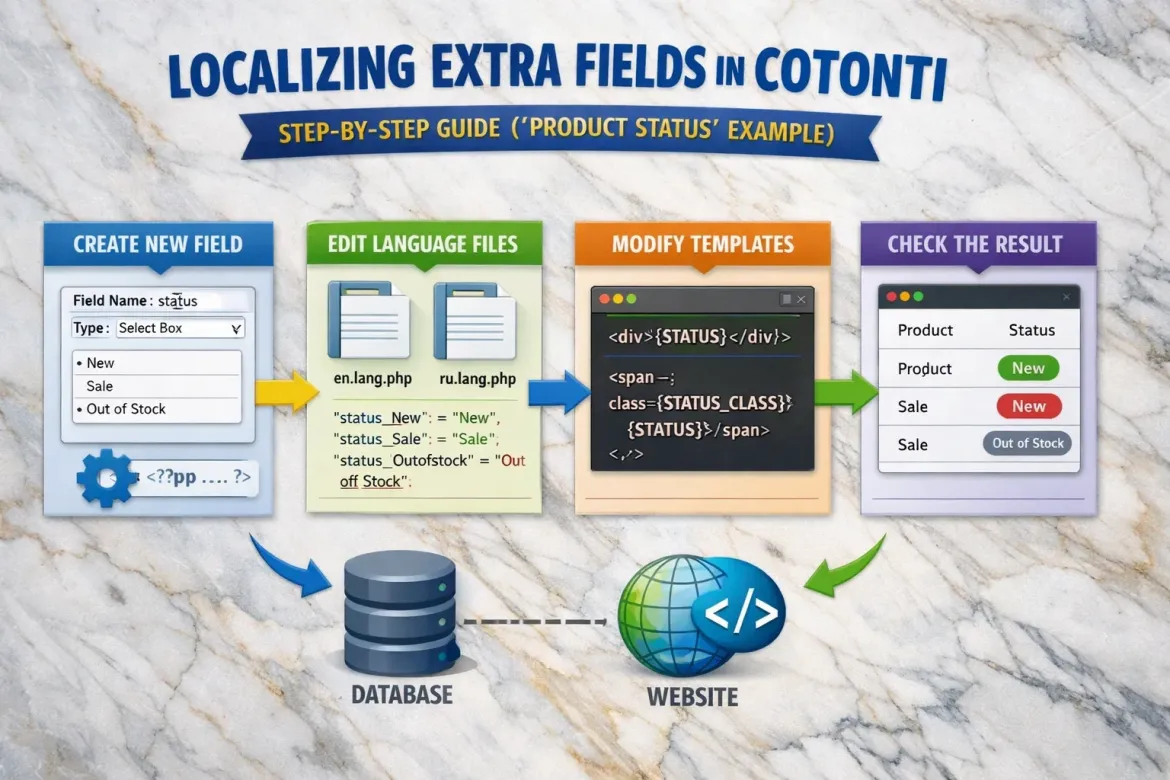
Starting from version 3.0.0, the plugin allows you to translate the values of text extra fields into several languages. This works for all fields of type input and textarea. You can, for example, write a product description in the default language, then provide translations into English, Ukrainian, or any other configured language — without modifying the Cotonti core and without installing additional internationalization modules.
Translations are stored in a separate database table, so the original value remains untouched. The plugin automatically selects the correct translation based on the language chosen by the visitor.
How It Works
- The main (original) field value is stored in the
cot_xtradbrowmarkettable, as before. - For each activated additional language, a separate record is created in the new
cot_xtradbrowmarket_i18ntable. This record contains the product ID, field name, language code, and translated text. - When displaying the product page, the plugin checks the current user language. If a translation exists, it is shown; otherwise, the original is displayed.
- If the main field happens to be empty but some translations are filled, the plugin can substitute the first available translation for the default language, preventing empty blocks from appearing.
All this happens automatically — just enable multilingual support and specify the desired language codes in the plugin configuration.
Configuration
The plugin adds a set of options to the standard Cotonti configuration page (Extensions → Configuration):
- Enable multilingual support (
xtradbrowmarket_i18n_use) — enables or disables the entire multilingual logic. When the option is off, the plugin works as before, and translations are ignored (but remain in the database). - Default site language code (
xtradbrowmarket_i18n_lang_code_default) — the language for which the main field value is considered the original. It should usually match your site'sdefaultlang. - First additional language — its code (e.g.,
en) and an activation checkbox. - Second additional language — its code (e.g.,
ua) and an activation checkbox. - Third additional language — its code (e.g.,
pl) and an activation checkbox.
You can activate up to three additional languages and change the codes at any time; previously saved translations will remain in the database.
Editing Translations
When multilingual support is enabled, the product editing form (market.edit.tpl) automatically shows an additional text field under each extra field of type input or textarea. These fields are labeled with the language code (e.g., (EN), (UA)) and allow you to enter a translation.
- If the original field is a plain
<input>(text), the translation field is also a text input. - If the original field is a
<textarea>, the translation field also becomes a<textarea>, so you can conveniently enter long texts.
Important: the group loop <!-- BEGIN: XTRA_EXTRAFLD --> is not suitable for displaying multilingual fields because it only shows the main fields. In order for administrators to fill in translations, you must use individual tags for each field and each language. For example:
<!-- IF {PHP|cot_plugin_active('xtradbrowmarket')} -->
<div class="card mb-4">
    <div class="card-body">
        <!-- IF {MARKETEDIT_FORM_XTRA_EVENT_DESCRIPTION} -->
        <div class="mb-3">
            <label>{MARKETEDIT_FORM_XTRA_EVENT_DESCRIPTION_TITLE}:</label>
            {MARKETEDIT_FORM_XTRA_EVENT_DESCRIPTION}
        </div>
        <!-- ENDIF -->
        <!-- IF {MARKETEDIT_FORM_XTRA_EVENT_DESCRIPTION_EN} -->
        <div class="mb-3">
            <label>{MARKETEDIT_FORM_XTRA_EVENT_DESCRIPTION_EN_TITLE}:</label>
            {MARKETEDIT_FORM_XTRA_EVENT_DESCRIPTION_EN}
        </div>
        <!-- ENDIF -->
        <!-- IF {MARKETEDIT_FORM_XTRA_EVENT_DESCRIPTION_UA} -->
        <div class="mb-3">
            <label>{MARKETEDIT_FORM_XTRA_EVENT_DESCRIPTION_UA_TITLE}:</label>
            {MARKETEDIT_FORM_XTRA_EVENT_DESCRIPTION_UA}
        </div>
        <!-- ENDIF -->
    </div>
</div>
<!-- ENDIF -->
After saving the product, the original value is written to the main table, and the translations go into cot_xtradbrowmarket_i18n.
Display on the Site
On the public side (product page, product list, header meta tags), the plugin automatically substitutes the translation for the active language. The same tags you used before work without changes:
<!-- IF {MARKET_XTRA_EVENT_DESCRIPTION} -->
<p>{MARKET_XTRA_EVENT_DESCRIPTION}</p>
<!-- ENDIF -->
If a visitor browses the site in English and a translation for event_description exists, they will see the English text; otherwise — the original.
A smart fallback is also implemented: if the original value for the default language is empty, but at least one translation exists, the plugin will show the first available translation for a visitor using the default language. This avoids empty fields when content was entered only in additional languages.
Deletion
When deleting a product, the plugin no longer needs to manually delete extra field records. The foreign key from cot_xtradbrowmarket to cot_market is set to ON DELETE CASCADE, so the database automatically removes both the main record and all its translations. The plugin is only responsible for deleting uploaded files (images, PDFs) before deletion, using the new market.delete.first hook.
Files Added/Modified for i18n
inc/xtradbrowmarket.functions.php— new functionsxtradbrowmarket_i18n_load,_save,_get_value.setup/xtradbrowmarket.install.sql— creation of thecot_xtradbrowmarket_i18ntable.xtradbrowmarket.setup.php— added a configuration block for language codes.xtradbrowmarket.market.edit.tags.php— display of translation fields.xtradbrowmarket.market.edit.update.done.php— saving translations.xtradbrowmarket.market.tags.php,xtradbrowmarket.markettags.php,xtradbrowmarket.header.tags.php— output considering the language.xtradbrowmarket.market.delete.first.php— new file for preliminary cleanup (replacesmarket.edit.delete.done.php).- Language files (
lang/xtradbrowmarket.*.lang.php) — contain configuration hints and translations for demo fields.
All existing functionality remains unchanged; multilingual capabilities are purely additive and can be ignored by setting the main switch to "0".
Step-by-Step Installation and Usage
Step 1. Download the Plugin
Download the plugin archive from the repository.
Step 2. Upload the Plugin to the Server
Upload the xtradbrowmarket folder to the plugins directory so that the file xtradbrowmarket.setup.php is located at:
/plugins/xtradbrowmarket/xtradbrowmarket.setup.phpAfter installation, if no errors occurred, the note will immediately contain a link:
After installing the plugin, open the Custom Extrafields Market plugin's extra fields.Or navigate to:
Administration → Extensions → Extra fields → Table cot_xtradbrowmarket - Custom Extrafields MarketBrowser link:
https://cotonti.local/admin/extrafields?n=cot_xtradbrowmarketThis is the heart of your plugin — 15 pre-installed demo extra fields will give you a complete picture of which extra field type suits which scenario and application.
Step 3. Configure the Product Editing Template
Open the product editing template — this is market.edit.tpl. Its correct "location":
/themes/index36/modules/market/market.edit.tpland before the "Yes"/"No" radio buttons for deleting the product, insert the following code:
<!-- IF {PHP|cot_plugin_active('xtradbrowmarket')} -->
<div class="card mb-4">
    <div class="card-header">
        <h4>{PHP.L.xtradbrowmarket_edittpl_dynamic_title}</h4>
    </div>
    <div class="card-body">
        <!-- BEGIN: XTRA_EXTRAFLD -->
        <div class="form-group mb-3">
            <label>{MARKETEDIT_FORM_XTRA_EXTRAFLD_TITLE}</label>
            {MARKETEDIT_FORM_XTRA_EXTRAFLD}
        </div>
        <!-- END: XTRA_EXTRAFLD -->
    </div>
</div>
<!-- ENDIF -->
Use the Tab key for proper indentation, then save the file. After that, open any product for editing, for example:
https://cotonti.local/market/1165?m=editAs mentioned, you should see all the fields before the "Yes"/"No" delete buttons (and right after installation there are 15 of them). Now fill all fields with some random data — don't be afraid to trust your intuition. Save the product and immediately go back to check what was saved in your fields. If everything is fine, proceed to editing the product page template.
Step 4. Configure the Product Page Template (market.tpl)
Open the product page template (full page with details) — this is market.tpl. Its correct "location":
/themes/index36/modules/market/market.tpl
/themes/index36/modules/market/market.category-name.tpl
Find the product title:
<h1 class="h4 mb-3">
    <!-- IF {PHP.item.fieldmrkt_product_status} == 'instock' -->
    <span class="px-2 fw-bold bg-success text-white rounded-2">{MARKET_PRODUCT_STATUS}</span>
    <!-- ENDIF -->
    <!-- IF {PHP.item.fieldmrkt_product_status} == 'onorder' -->
    <span class="fw-bold text-warning-hot">{MARKET_PRODUCT_STATUS}</span>
    <!-- ENDIF -->
    {MARKET_TITLE}
</h1>
and immediately after it, or in any other place of your choice, insert the following code:
<!-- IF {PHP.usr.maingrp} == 5 -->
<!-- IF {PHP|cot_plugin_active('xtradbrowmarket')} -->
<div class="card mb-4">
    <div class="card-header">
        <h4 class="mb-3">{PHP.L.xtradbrowmarket_pagetpl_custom_title}</h4>
        <small class="mb-3">{PHP.L.xtradbrowmarket_pagetpl_custom_desc}</small>
    </div>
    <div class="card-body">

        <!-- event_name (input) -->
        <!-- IF {MARKET_XTRA_EVENT_NAME} -->
        <div class="mb-3">
            <i class="fa-regular fa-calendar-check me-2 text-primary"></i>
            <strong>{MARKET_XTRA_EVENT_NAME_TITLE}:</strong>
            <span class="fw-semibold">{MARKET_XTRA_EVENT_NAME}</span>
        </div>
        <!-- ENDIF -->

        <!-- event_description (textarea) with tag stripping and truncation -->
        <!-- IF {MARKET_XTRA_EVENT_DESCRIPTION} -->
        <div class="mb-3 p-3 bg-light rounded">
            <h6 class="fw-bold"><i class="fa-solid fa-align-left me-1"></i> {MARKET_XTRA_EVENT_DESCRIPTION_TITLE}</h6>
            <p class="mb-0">
                {MARKET_XTRA_EVENT_DESCRIPTION_VALUE|strip_tags($this)|mb_substr($this, 0, 150, 'UTF-8')}...
            </p>
        </div>
        <!-- ENDIF -->

        <!-- event_start (datetime) – formatting via cot_date -->
        <!-- IF {MARKET_XTRA_EVENT_START} -->
        <div class="mb-3">
            <i class="fa-regular fa-clock me-2 text-warning"></i>
            <strong>{MARKET_XTRA_EVENT_START_TITLE}:</strong>
            <span class="badge bg-warning text-dark">
                {MARKET_XTRA_EVENT_START_VALUE|cot_date('d.m.Y H:i', $this)}
            </span>
        </div>
        <!-- ENDIF -->

        <!-- event_ticketprice (double) -->
        <!-- IF {MARKET_XTRA_EVENT_TICKETPRICE} -->
        <div class="mb-3">
            <i class="fa-solid fa-dollar-sign me-2 text-success"></i>
            <strong>{MARKET_XTRA_EVENT_TICKETPRICE_TITLE}:</strong>
            <!-- IF {MARKET_XTRA_EVENT_TICKETPRICE_VALUE} == '0' -->
            <span class="badge bg-success">Free</span>
            <!-- ELSE -->
            <span class="fs-3 fw-bold">
                {MARKET_XTRA_EVENT_TICKETPRICE_VALUE} $
            </span>
            <!-- ENDIF -->
        </div>
        <!-- ENDIF -->

        <!-- event_seson (select) – nested IF instead of ELSEIF -->
        <!-- IF {MARKET_XTRA_EVENT_SESON} -->
        <div class="mb-3">
            <i class="fa-solid fa-cloud-sun me-2 text-success"></i>
            <strong>{MARKET_XTRA_EVENT_SESON_TITLE}:</strong>
            <!-- IF {MARKET_XTRA_EVENT_SESON_VALUE} == 'winter' -->
            <span>❄️ Winter</span>
            <!-- ELSE -->
            <!-- IF {MARKET_XTRA_EVENT_SESON_VALUE} == 'spring' -->
            <span>🌱 Spring</span>
            <!-- ELSE -->
            <!-- IF {MARKET_XTRA_EVENT_SESON_VALUE} == 'summer' -->
            <span>☀️ Summer</span>
            <!-- ELSE -->
            <!-- IF {MARKET_XTRA_EVENT_SESON_VALUE} == 'autumn' -->
            <span>🍂 Autumn</span>
            <!-- ELSE -->
            <span class="text-capitalize">{MARKET_XTRA_EVENT_SESON}</span>
            <!-- ENDIF -->
            <!-- ENDIF -->
            <!-- ENDIF -->
            <!-- ENDIF -->
        </div>
        <!-- ENDIF -->

        <!-- demo_int (inputint) -->
        <!-- IF {MARKET_XTRA_DEMO_INT} -->
        <div class="mb-3">
            <span class="fa-stack fa-sm me-2">
                <i class="fa-solid fa-circle fa-stack-2x text-secondary"></i>
                <i class="fa-solid fa-hashtag fa-stack-1x fa-inverse"></i>
            </span>
            <strong>{MARKET_XTRA_DEMO_INT_TITLE}:</strong>
            <span class="badge bg-secondary">{MARKET_XTRA_DEMO_INT}</span>
        </div>
        <!-- ENDIF -->

        <!-- demo_double (double) -->
        <!-- IF {MARKET_XTRA_DEMO_DOUBLE} -->
        <div class="mb-3">
            <i class="fa-solid fa-dollar-sign me-2 text-success"></i>
            <strong>{MARKET_XTRA_DEMO_DOUBLE_TITLE}:</strong>
            <!-- IF {MARKET_XTRA_DEMO_DOUBLE_VALUE} == '0.00' -->
            <span class="text-muted">not specified</span>
            <!-- ELSE -->
            {MARKET_XTRA_DEMO_DOUBLE_VALUE}
            <!-- ENDIF -->
        </div>
        <!-- ENDIF -->

        <!-- demo_select (select) -->
        <!-- IF {MARKET_XTRA_DEMO_SELECT} -->
        <div class="mb-3">
            <i class="fa-solid fa-list me-2 text-info"></i>
            <strong>{MARKET_XTRA_DEMO_SELECT_TITLE}:</strong>
            <span class="badge bg-info text-dark">{MARKET_XTRA_DEMO_SELECT}</span>
        </div>
        <!-- ENDIF -->

        <!-- demo_radio (radio) – checking the value inside IF -->
        <!-- IF {MARKET_XTRA_DEMO_RADIO} -->
        <div class="mb-3">
            <i class="fa-solid fa-circle-dot me-2 text-secondary"></i>
            <strong>{MARKET_XTRA_DEMO_RADIO_TITLE}:</strong>
            <!-- IF {MARKET_XTRA_DEMO_RADIO_VALUE} == 'Yes' -->
            <span class="text-success fw-bold">Yes</span>
            <!-- ELSE -->
            <span class="text-danger fw-bold">No</span>
            <!-- ENDIF -->
        </div>
        <!-- ENDIF -->

        <!-- demo_datetime (datetime) -->
        <!-- IF {MARKET_XTRA_DEMO_DATETIME} -->
        <div class="mb-3">
            <i class="fa-regular fa-calendar me-2 text-danger"></i>
            <strong>{MARKET_XTRA_DEMO_DATETIME_TITLE}:</strong>
            <span class="text-muted">
                {MARKET_XTRA_DEMO_DATETIME_VALUE|cot_date('d.m.Y H:i', $this)}
            </span>
        </div>
        <!-- ENDIF -->

        <!-- demo_file (file)  -->
        <!-- IF {MARKET_XTRA_DEMO_FILE} -->
        <div class="mb-3">
            <i class="fa-solid fa-paperclip me-2"></i>
            <strong>{MARKET_XTRA_DEMO_FILE_TITLE}:</strong>
            <a href="{PHP.cfg.mainurl}/datas/exflds/xtradbrowmarket/{MARKET_XTRA_DEMO_FILE}" target="_blank">
                {MARKET_XTRA_DEMO_FILE}
            </a>
        </div>
        <!-- ENDIF -->

        <!-- demo_country (country) -->
        <!-- IF {MARKET_XTRA_DEMO_COUNTRY} -->
        <div class="mb-3">
            <img src="images/flags/{MARKET_XTRA_DEMO_COUNTRY_VALUE}.svg"
            style="width:24px;height:auto;" class="me-2" alt="">
            <strong>{MARKET_XTRA_DEMO_COUNTRY_TITLE}:</strong>
            <span>{MARKET_XTRA_DEMO_COUNTRY}</span>    <span>{MARKET_XTRA_DEMO_COUNTRY_NAME}</span>
        </div>
        <!-- ENDIF -->

        <!-- demo_range (range) – progress bar with real value -->
        <!-- IF {MARKET_XTRA_DEMO_RANGE} -->
        <div class="mb-3">
            <i class="fa-solid fa-sliders me-2" style="color:#6f42c1;"></i>
            <strong>{MARKET_XTRA_DEMO_RANGE_TITLE}:</strong>
            <div class="progress mt-1" style="height:20px;">
                <div class="progress-bar bg-info" role="progressbar"
                style="width:{MARKET_XTRA_DEMO_RANGE_VALUE}%;"
                aria-valuenow="{MARKET_XTRA_DEMO_RANGE_VALUE}" aria-valuemin="0" aria-valuemax="100">
                    {MARKET_XTRA_DEMO_RANGE_VALUE}%
                </div>
            </div>
        </div>
        <!-- ENDIF -->

        <!-- demo_checklistbox (checklistbox) -->
        <!-- IF {MARKET_XTRA_DEMO_CHECKLISTBOX} -->
        <div class="mb-3">
            <i class="fa-solid fa-check-double me-2 text-primary"></i>
            <strong>{MARKET_XTRA_DEMO_CHECKLISTBOX_TITLE}:</strong>
            <span class="text-muted">{MARKET_XTRA_DEMO_CHECKLISTBOX}</span>
        </div>
        <!-- ENDIF -->

    </div>
</div>
<!-- ENDIF -->
<!-- ENDIF -->
Note that here I wrap the plugin activity check in a conditional "frame":
<!-- IF {PHP.usr.maingrp} == 5 -->
<!-- IF {PHP|cot_plugin_active('xtradbrowmarket')} -->
<div class="card mb-4">
    ... blah-blah-blah ....
</div>
<!-- ENDIF -->
<!-- ENDIF -->
– this will be shown only to the super administrator and only if the plugin is active. This is convenient while you are bringing something to production (live site). After you have "configured" this log for yourself, you can safely remove the frame: <!-- IF {PHP.usr.maingrp} == 5 --> – delete this line, which declares the condition (show to admin), leaving all the inner code untouched. <!-- ENDIF --> – delete this line, which closes the condition (show to admin).
Step 5. Configure the Product List Template (market.list.tpl)
Open the product list template in a category, categories, or without them — this is market.list.tpl. Its correct "location":
/themes/index36/modules/market/market.list.tpl
/themes/index36/modules/market/market.list.category-name.tpl
Scroll to the product loop block:
<div class="row row-cols-1 row-cols-xl-3 row-cols-lg-2 row-cols-md-1 g-3 g-lg-4" id="market-items-container">
    <!-- BEGIN: LIST_ROW -->
    <div class="col">
     ...
    </div>
    <!-- END: LIST_ROW -->
</div>
And, for example, right after the link to the product page:
<h5 class="card-title mb-2">
    <a href="{LIST_ROW_URL}" class="text-decoration-none">{LIST_ROW_TITLE}</a>
</h5>
add the following code:
<!-- IF {PHP|cot_plugin_active('xtradbrowmarket')} -->

<!-- just as an example – country of origin -->
<!-- IF {LIST_ROW_XTRA_DEMO_COUNTRY} -->
<div class="mb-3">
    <img src="images/flags/{LIST_ROW_XTRA_DEMO_COUNTRY_VALUE}.svg"
         style="width:24px;height:auto;" class="me-2" alt="">
    <strong>{LIST_ROW_XTRA_DEMO_COUNTRY_TITLE}:</strong>
    <span>{LIST_ROW_XTRA_DEMO_COUNTRY}</span>    <span>{LIST_ROW_XTRA_DEMO_COUNTRY_NAME}</span>
</div>
<!-- ENDIF -->

<!-- just as an example – market release date -->
<!-- IF {LIST_ROW_XTRA_EVENT_START} -->
<div class="mb-3">
    <strong>{LIST_ROW_XTRA_EVENT_START_TITLE}:</strong>
    <span class="text-primary"><i class="fa-regular fa-alarm-clock fa-xl"></i></span>
    <span class="ms-2 fw-bold text-danger">{LIST_ROW_XTRA_EVENT_START}</span>
</div>
<!-- ENDIF -->

<!-- ENDIF -->
Save the file, then go to the product list and see the result (see screenshots).
Displaying Custom Extra Fields in header.tpl
Its correct "location":
/themes/index36/header.tplThe goals of such an implementation can be very different; the main thing is that we have a flexible and fairly simple way to solve specific tasks — for example, to tell search engines something individual about each product on our site.
Ideally, of course, one would like to have a dedicated "site header" for products — a custom template header.market.tpl or even one for each required category — header.market.notebook.tpl, header.market.mobile-phones.tpl, etc. In Cotonti, this is indeed possible:
/themes/index36/header.tpl – common header
/themes/index36/header.list.tpl – header for the article list
/themes/index36/header.page.news.tpl – header for a full article page from the "news" category
/themes/index36/header.market.tpl – common header for the "market" module
/themes/index36/header.market.notebook.tpl – header for a product page in the "Notebooks" category
Practical Example for header.market.notebook.tpl
Let's open:
/themes/index36/header.market.notebook.tplhere it is:
<!--
    /********************************************************************************
    * File: header.tpl
    * Extension: Core'
    * Description: HTML template for header.tpl.
    * Compatibility: CMF/CMS Cotonti Siena v0.9.26[](https://github.com/Cotonti/Cotonti)
    * Dependencies:
    *        Bootstrap 5.3.+[](https://getbootstrap.com/);
    *        Font Awesome Free 7.1[](https://fontawesome.com/)
    * Theme: Index36
    * Version: 1.0.2
    * Created: 01 Feb 2026
    * Updated: 22 Apr 2026
    * Copyright (c) 2026 webitproff | https://github.com/webitproff
    * Source: https://github.com/webitproff/index36-cotonti-theme
    * Demo : https://freelance-script.abuyfile.com/
    * Help and support: https://abuyfile.com/ru/forums/cotonti/original/skins/index36
    * License: BSD (Free distribution with saving Copyright (c) 2026 webitproff)
    ********************************************************************************/
-->
<!-- BEGIN: HEADER -->
<!DOCTYPE html>
    <!-- IF {HTML_LANG} -->
    <html lang="{HTML_LANG}" data-bs-theme="light">
    <!-- ELSE -->
    <html lang="{PHP.usr.lang}" data-bs-theme="light">
    <!-- ENDIF -->
    <head>
        <meta charset="UTF-8">
        <meta name="viewport" content="width=device-width, initial-scale=1">
        <!-- IF {I18N_HEADER_META_TITLE} -->
        <title>{I18N_HEADER_META_TITLE}</title>
        <!-- ELSE -->
        <title>{HEADER_TITLE}</title>
        <!-- ENDIF -->
    <!-- IF {I18N_HEADER_META_DESCRIPTION} -->
        <meta name="description" content="{I18N_HEADER_META_DESCRIPTION}" />
    <!-- ELSE -->
        <!-- IF {HEADER_META_DESCRIPTION} -->
        <meta name="description" content="{HEADER_META_DESCRIPTION}" />
        <!-- ENDIF -->
    <!-- ENDIF -->
        <!-- IF {HEADER_BASEHREF} -->
        {HEADER_BASEHREF}
        <!-- ENDIF -->
        <!-- IF {HEADER_CANONICAL_URL} -->
        <link rel="canonical" href="{HEADER_CANONICAL_URL}" />
        <!-- ENDIF -->
        <!-- IF {ALTERNATE_TAGS} -->
        {ALTERNATE_TAGS}
        <!-- ENDIF -->
        <link rel="shortcut icon" href="favicon.ico" />
        <link rel="icon" href="{PHP.cfg.themes_dir}/{PHP.theme}/img/icon.webp" type="image/svg+xml">
        <link rel="apple-touch-icon" href="apple-touch-icon.png" />
        <!-- IF {PHP.out.meta} -->
        {PHP.out.meta}
        <!-- ENDIF -->
        <script>
            (function () {
                const storedTheme = localStorage.getItem('theme');
                const prefersDark = window.matchMedia('(prefers-color-scheme: dark)').matches;
                const defaultTheme = storedTheme || (prefersDark ? 'dark' : 'light');
                document.documentElement.setAttribute('data-bs-theme', defaultTheme);
            })();
        </script>
        {HEADER_HEAD}
    </head>
    <body class="sidebar-closed">
        <header class="navbar navbar-expand-lg shadow-sm fixed-top" style="background-color: var(--bs-header-bg);" data-bs-theme="inherit">
               ....
                <div class="d-flex align-items-center gap-3 ms-auto">
                    <!-- BEGIN: I18N_LANG -->
                    <div class="btn-group">
                        <button type="button" class="dropdown-toggle btn nav-link d-flex align-items-center" data-bs-toggle="dropdown">
                            <i class="fa-solid fa-language me-2"></i>
                            <!-- IF {PHP.i18n_locale} == 'ru' -->RU<!-- ENDIF -->
                            <!-- IF {PHP.i18n_locale} == 'cn' -->CN<!-- ENDIF -->
                            <!-- IF {PHP.i18n_locale} == 'en' -->EN<!-- ENDIF -->
                            <!-- IF {PHP.i18n_locale} == 'ua' -->UA<!-- ENDIF -->
                        </button>
                        <ul class="dropdown-menu dropdown-menu-end">
                            <!-- BEGIN: I18N_LANG_ROW -->
                            <li><a class="dropdown-item" href="{I18N_LANG_ROW_URL}">{I18N_LANG_ROW_TITLE}</a></li>
                            <!-- END: I18N_LANG_ROW -->
                        </ul>
                    </div>
                    <!-- END: I18N_LANG -->

            ...
        </header>

        <aside class="main-sidebar">
            ...
        </aside>

        <div class="expanded-panels ps-container">
        ...
        </div>
        <main>
<!-- END: HEADER -->
I'm showing a working example of field output, not the semantic meaning they carry in the examples, so you can combine them as you wish. Find:
<title>{HEADER_TITLE}</title>replace with:
<title>{HEADER_TITLE} <!-- IF {MARKET_HEADER_XTRA_DEMO_COUNTRY} -->. {MARKET_HEADER_XTRA_DEMO_COUNTRY_NAME}<!-- ENDIF --></title>Instead of:
<title>Super cool product</title>the browser will show:
<title>Super cool product. China</title>then find:
<!-- IF {HEADER_META_DESCRIPTION} --><meta name="description" content="{HEADER_META_DESCRIPTION}<!-- ENDIF -->" />
<!-- ENDIF -->
replace with:
<!-- IF {HEADER_META_DESCRIPTION} --><meta name="description" content="{HEADER_META_DESCRIPTION}<!-- IF {MARKET_HEADER_XTRA_EVENT_START} -->  • {MARKET_HEADER_XTRA_EVENT_START_TITLE} {MARKET_HEADER_XTRA_EVENT_START}<!-- ENDIF -->" />
<!-- ENDIF -->
and now instead of:
<meta name="description" content="Buy a product with the coolest AI-generated description" />we get:
<meta name="description" content="Buy a product with the coolest AI-generated description • Promotional sale only with us from 27.05.2026 10:10" />Extrafields Market Custom i18n is not just a small toolkit, but a precise hub that lets you place exactly what you need and exactly where you need it — integrating metadata or any content into the system through genuinely simple extra field output — that’s the tip of the iceberg. But when you start using this plugin to build “modular product descriptions” — and with language translations right away — it’s truly mind‑blowing. First of all, it’s interesting, and secondly, search engines react to it like a cat to valerian, with the right SEO approach.
Buy Extrafields Market Custom at low prices. Online store offers to order Extrafields Market Custom, view full description, detailed characteristics, product photos and current prices with discounts
Offline
webitproff
Last logged: 2026-09-19 10:26
- Publication date 2026-04-27 09:14
- Updated 2026-09-13 13:34
Featured articles for this product
Localization (multilingualism) of Extra-fields. Instruction manual

Modular product descriptions are easy!
Featured Products and Services
The Plugin Custom Extrafields for Pages module of Cotonti CMF

Cotonti CMF: Plugin Installation, Integration, and Adaptation

Userfields Plugin for CMF Cotonti 0.9.26
Последние сообщения
- i18n modified - Модифицированный плагин мультиязычности
webitproff, 2026-09-19 07:55i18n modified - Модифицированный плагин мультиязычности
- Пропали ссылки на плагины в шаблонах
webitproff, 2026-09-19 06:07еще по теме, если есть ложное срабатывание при проверке активности плагина, - читать статью “Баг в ядре Cotonti при проверки активности плагина с всего одним хуком”
- Market PRO + всё, что связано с ЧПУ
webitproff, 2026-09-13 01:11частиный functions.custom.php <?php /** * Файл: system/functions.custom.php * * Читать инструкцию https://github.com/webitproff/functions.custom.php-cotonti/blob/main/README.md * * Пользоват...
- Market PRO + всё, что связано с ЧПУ
webitproff, 2026-09-13 01:09пресет правил/plugins/urleditor/presets/marketplace.datforums m=posts&q=&d= forums/{forums_url_structure()}/page{$d} forums m=posts&q=* forums/{forums_url_structure()} forums ...
- Tab "вкладка товаров" на странице профиля пользователя
webitproff, 2026-09-13 00:43Подробное описание файла market.userdetails.php1. Общая информация Параметр Значение Имя файла market.userdetails.php Расположение modules/market/market.userdetails.php Хук Cotonti users.details.ta...
- Multicat Market - Плагин для CMF Cotonti
webitproff, 2026-09-11 23:11Multicat MarketПлагин для модуля Market v5+ CMF Cotonti, позволяющий назначать одному товару (странице модуля Market) сразу несколько категорий структуры market. Вся реализация выполнена через стандар...
- Market PRO — модуль интернет-магазина и торговой площадки для Cotonti
webitproff, 2026-09-10 13:44Market PRO — модуль интернет-магазина и торговой площадки для CotontiГотовое решение для создания как классического интернет-магазина с одним продавцом, так и полноценной торговой площадки (маркетплей...
- Полное руководство по функции cot_market_enum()
webitproff, 2026-09-10 02:56Полное руководство по функции cot_market_enum()Функция cot_market_enum() — это мощный генератор списков товаров для модуля Market в Cotonti. Она позволяет вывести товары в любом месте сайта: на главно...
- В формах добавления и редактирования пропали картинки
webitproff, 2026-09-09 17:21Решил я “допекти” модуль товаров под котонти верону основательно. в процессе доработок тестирую, по привычке по ссылке гружу картинку к товару и какой-то там эрор без смысловой нагрузки и картинки нет...
- Инструкция: вывод в шаблон имени и ссылки на профиль пользователя в Cotonti
webitproff, 2026-09-07 15:15Инструкция: вывод имени и ссылки на профиль пользователя в CotontiВ этой инструкции описано, как получить данные о пользователе (текущем или владельце любой сущности) и передать их в шаблон в виде трё...
Recommended forum topics for this product

Extrafields Market Custom i18n для модуля “Market” плагин Cotonti
Market PRO Showcase
CMS, Script and Engine - website of an online showcase, online store of digital products and digital goods. Different prices in different currencies for the product. Online cryptocurrency payment for goods and services.