Multipage articles with pagination in Cotonti

Multi-page articles are needed to make long texts easier to read and structure. They allow you to split content into several pages, each with its own title and separate URL.

Instructions: multi-page articles in Cotonti

Multi-page articles are needed to make long texts easier to read and structure. They allow you to split content into several pages, each with its own title and separate URL. This is convenient for visitors, improves SEO, speeds up page loading, and makes articles look more professional. This approach helps users quickly find the information they need and consume it comfortably, while helping site owners organize content more effectively.


demo of a multi-page article with pagination

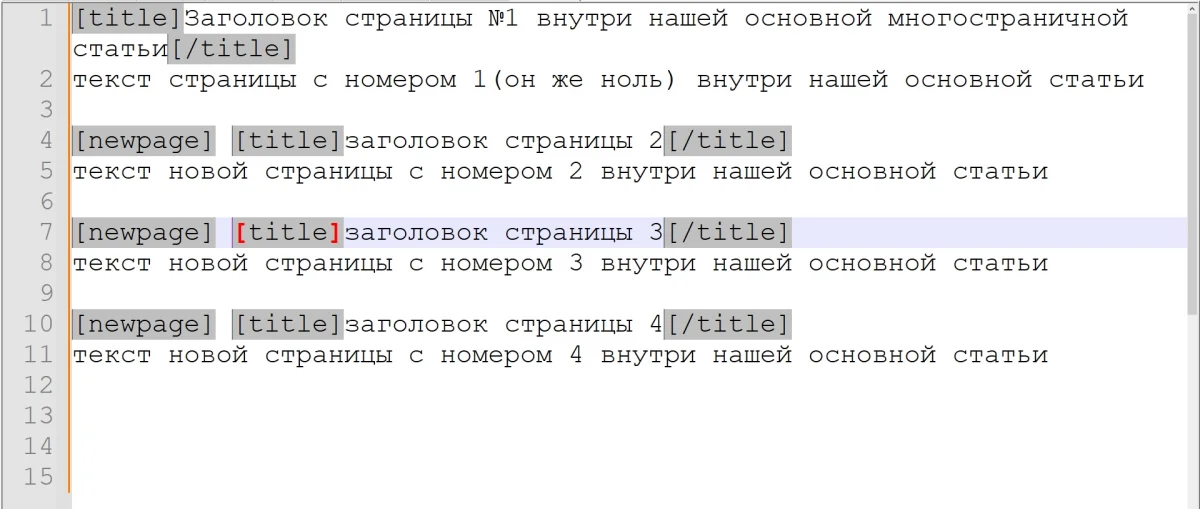
and here is a screenshot (grey tags show the structure example — follow it; you can change the text freely)

att_1039.webp


1. Basic principle

In Cotonti, a single article can be automatically split into multiple pages using special tags inside the text.

Two service tags are used:

{[}newpage{]}

and

{[}title{]}Page title{[}/title{]} 


in {[}tagname{]} you need to remove the square brackets and replace them with curly ones. see screenshot for correct format


2. Splitting an article into pages

To split an article into multiple pages, insert the tag:

{[}newpage{]}

Example:

This is the text of the first page of the article. 

{[}newpage{]} 

This is the text of the second page. 

{[}newpage{]} 

This is the text of the third page.

After publishing, Cotonti automatically:

  • splits the text into tabs
  • creates navigation between pages
  • adds the pg parameter to the URL

Example URL:

/page?c=articles&id=15 
/page?c=articles&id=15&pg=1 
/page?c=articles&id=15&pg=2 


3. Title of each page

If no title is specified, the system generates it automatically:

Page 1 
Page 2 
Page 3

But you can define custom titles.

Example

{[}title{]}Introduction{[}/title{]} 
This is the text of the first page. 

{[}newpage{]} 

{[}title{]}System setup{[}/title{]} 
Setup description. 

{[}newpage{]} 

{[}title{]}Conclusion{[}/title{]} 
Article summary. 


4. What happens inside the system

The page code uses:

$pag{[}'page_tabs'{]} = explode('{[}newpage{]}', $t->vars{[}'PAGE_TEXT'{]}, 99);

This means:

  1. the article text is split by {[}newpage{]}
  2. each part becomes a separate page
  3. number of pages:

$pag{[}'page_totaltabs'{]} 


5. Page navigation

Cotonti automatically generates:

PAGE_MULTI_TABNAV

This is standard navigation:

1 2 3 4

Also available template variables:

VariableDescription
PAGE_MULTI_TABNAVnavigation
PAGE_MULTI_CURTABcurrent page
PAGE_MULTI_MAXTABtotal pages
PAGE_MULTI_TABTITLESlist of titles

6. Full article example

{[}title{]}What is Cotonti{[}/title{]} 

Cotonti is a CMS and CMF system. 

{[}newpage{]} 

{[}title{]}Installing Cotonti{[}/title{]} 

1. Download archive 
2. Extract 
3. Configure database 

{[}newpage{]} 

{[}title{]}Conclusion{[}/title{]} 

Now you know the basics of Cotonti. 


7. How {[}more{]} works

A separate tag:

{[}more{]}

or

<!--more-->

is used for article preview, not for page splitting.

Function:

cot_cut_more()

truncates text in article lists.


8. Limitations

By default:

explode('{[}newpage{]}', ..., 99)

Maximum:

98 pages per article


9. SEO feature

Each page has its own URL:

?pg=0 
?pg=1 
?pg=2

Canonical is generated automatically:

Cot::$out{[}'canonical_uri'{]} 


10. Useful advice

It is better to split articles into:

  • 2000–3000 words per page
  • 5–10 pages maximum

This improves:

  • SEO
  • loading time
  • readability
2 minutes read Sodium Carbonate

Comments (0)

No comments yet
Only registered users can post new comments

Recommended Products and Services

Cotonti CMF: Plugin Installation, Integration, and Adaptation

Cotonti CMF: Plugin Installation, Integration, and Adaptation

professional services for the installation, deep integration and adaptation of plug-ins for Cotonti

Content author

webitproff

Offline

Sodium Carbonate

Last logged: 2026-07-18 14:46

  • Page published: 2026-03-08 15:06
  • Last update: 2026-03-08 17:09
  • Language:

Similar pages

"User Articles" (Статьи пользователей)
1 Плагин "Статьи пользователей" для Cotonti Описание Плагин "Статьи пользователей" — это

Recommended forum topics for this article

Пагинация в мультистраницах. ошибка 404

Пагинация в мультистраницах. ошибка 404

в вызове cot_pagenav() для мульти страниц (page модуль) не передаётся параметр категории c=
#187 | Постов: 1 | Просмотров: 403